VIBAN Query Transaction
PayTabs provides you with a collection of API endpoints which used to process all payments, regardless of if they are through either your own payment pages, the managed payment pages, or if you are using the hosted payment pages.
If you have an IBAN transaction that you want to fetch its details and know more about its status, type, etc... you can use the IBAN query transaction endpoint, as it will return the details of the requested transaction. In this article, we walk you through how to use and manage the mentioned endpoint.The Endpoint and Related Postman Collection
In this tutorial, we will rely on the API Endpoint, mentioned on PayTabs API endpoints postman collection, which you can access fromKSA PayTabs Postman APIs Collection. The endpoint will need to be accessed with a POST request on the below-mentioned URL| Get | {{domain}}/payment/viban/status/[PROFILE_ID]/[VIBAN_REF] |
|---|
Be Aware Of
Please note that not using the proper endpoint URL {domain} will lead to authentication issues within your responses. To find the your proper domain you can read ourWhat is my (Region)/(endpoint URL)?tutorial article.
- KSA
https://secure.paytabs.sa/payment/viban/status/[PROFILE_ID]/[VIBAN_REF]
Be Aware Of
Regarding the
VIBAN_ref parameter, you can find it in the response received after creating a VIBAN transaction, as it is returned as a response parameter with the name viban_ref. So, if you want to use the query endpoint to check the status of a specific VIBAN transaction, make sure to save the viban_ref value received in the response of the VIBAN transaction creation, as you will need to use it as a reference in your query request to be able to retrieve the details of that specific transaction.Request Parameters
To initiate a query payment request, there are minimum required parameters that need to be passed with valid information. The specification of these required parameters is clarified below according to the query type:VIBAN status Via VIBAN Reference
In this type, you can initiate query requests using the "VIBAN Reference" and the requested. You will receive a response object of this specific VIBAN request you referred to. Kindly check the request parameters' specifications below:
- The Minimum Required Parameters
| Parameter | Data Type | Min | Max | Required |
|---|---|---|---|---|
| INT STRING | Accept only valid profile number. | ✔ | |
| The merchant Profile ID you can get from your PayTabs dashboard. For more information please check our How to get your account information from PT Dashboard? solution article. To know more about this parameter please click here. | ||||
| ||||
| Parameter | Data Type | Min | Max | Required |
|---|---|---|---|---|
| STRING | ✔ | ||
| The unique reference identifier for the created VIBAN transaction, which is returned in the response of the VIBAN transaction creation. You can use this reference to track the transaction or to check its status using the dedicated endpoint for checking the VIBAN transaction status. Returned on success only. | ||||
| ||||
Request & Response Payload Samples
This section is dedicated give you a sample API request payload using the above mentioned required parameters, along with showing you the response payload received upon using the request payload.- Required Parameters Sample Payloads
The below sample request payload will show you how you can pass the above-mentioned required parameter/s, which are needed to be passed with valid values to perform a request. Along with the response payload received after using this request payload.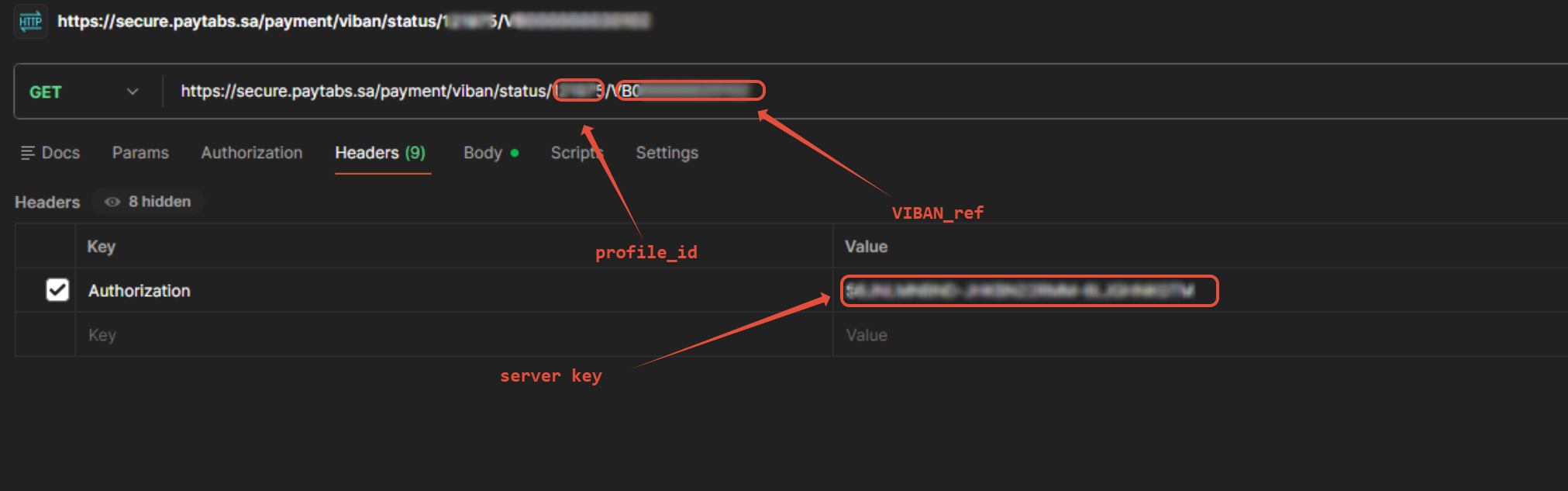
- Sample Request Payload
- Sample Response Payload
{
"viban_ref": "VB000000020102",
"viban": "SA4730100944000000000060",
"profile_id": 106721,
"status": 1,
"currency": "SAR",
"total_amount": "10.00",
"paid_amount": "0.00",
"cart_id": "89898",
"cart_description": "new"
}
Be Aware Of
Regarding the
1 = Active
2 = Inactive
3 = Paid (meaning the paid amount is equal to or greater than the total amount)
status parameter in the response payload, you can refer to the below table to understand the meaning of each status code value that can be received in the response:1 = Active
2 = Inactive
3 = Paid (meaning the paid amount is equal to or greater than the total amount)
The Payment Flow Experience
Reaching this stage, you are now able to retrieve the status of a VIBAN transaction using the direct API GET request. Please note that this process differs from the VIBAN creation flow. Below is a clear breakdown of how it works:- Triggering the VIBAN Status Request:
- The merchant’s system initiates a GET request to retrieve the current VIBAN transaction status.
- The request must follow the specifications provided in theRequest & Response Payload Samples.
- Receiving the VIBAN Status:
Once the request is successfully processed, as a part from the response ,PayTabs returns the status parameter of the VIBAN transaction in the response:"status": 1
The status may be one of the following values:- 1 = Active — The VIBAN is active and awaiting payment.
- 2 = Inactive — The VIBAN is no longer valid for payment.
- 3 = Paid — The customer has completed the payment (paid amount is equal to or greater than the required amount).
- Handling the Status:
Based on the returned status, the merchant's system applies the appropriate business logic:- Status 1 (Active): Continue waiting for customer payment.
- Status 2 (Inactive): Stop expecting payment using this VIBAN.
- Status 3 (Paid): Consider the payment complete and proceed with order processing.
- Updating the Customer or Internal System:
The merchant may update their internal system or display the VIBAN status to the customer, depending on the business workflow.
- The merchant’s system sends the VIBAN Status GET request.
- PayTabs responds with the current status value (1, 2, or 3).
- The merchant interprets the status (Active, Inactive, or Paid).
- The merchant updates the business workflow accordingly.