Initiate Agreement Payments (Repeat Billing)
PayTabs provides you with a collection of API endpoints which used to process all payments, regardless of if they are through either your own payment pages, the managed payment pages, or if you are using the hosted payment pages.
Repeat billing is a feature that enables merchants to automatically send invoices to their customers at set intervals—weekly, monthly, or annually—for subscription products or services. This feature is available through our Merchant dashboard.
You can learn more about how you can initiate and manage your Repeat Billing payment through PayTabs merchant dashboard by clicking hereRepeat Billing & Repeat Invoicing
Please note that to create any Repeat Billing agreements, you must have a secure terms and conditions URL set up in your PayTabs profile. If you haven't done this yet, please reach out to your account manager or customer care and provide them with the URL so they can configure it for you. If you don't follow the steps outlined in this manual for setting up the URL, your request may be denied.
The Endpoint and Related Postman Collection
In this tutorial, we will rely on the PayTabs Hosted Payment Page API Endpoint, mentioned on PayTabs API endpoints postman collection, which you can access from PayTabs Postman APIs Collection. The endpoint will need to be accessed with a POST request on the below-mentioned URL
| POST | {{domain}}/payment/request |
|---|
Please note that not using the proper endpoint URL {domain} will lead to authentication issues within your responses. To find the your proper domain you can read ourWhat is my (Region)/(endpoint URL)?tutorial article.
- KSA
- UAE
- Egypt
- Oman
- Jordan
- Kuwait
- Iraq
- Morocco
- Qatar
- Global
https://secure.paytabs.sa/payment/request
https://secure.paytabs.com/payment/request
https://secure-egypt.paytabs.com/payment/request
https://secure-oman.paytabs.com/payment/request
https://secure-jordan.paytabs.com/payment/request
https://secure-kuwait.paytabs.com/payment/request
https://secure-iraq.paytabs.com/payment/request
https://secure-morocco.paytabs.com/payment/request
https://secure-doha.paytabs.com/payment/request
https://secure-global.paytabs.com/payment/request
Request Parameters
- The Minimum Required Parameters
- The Available Optional Parameters
To create a Repeat Billing agreement using our APIs, you need to include not only the general required parameters mentioned earlier but also some additional parameters specific to the agreement. Below are all the parameters needed for the Repeat Billing Agreement payment:
| Parameter | Data Type | Min | Max | Required |
|---|---|---|---|---|
| INT STRING | Accept only valid profile number. | ✔ | |
| The merchant Profile ID you can get from your PayTabs dashboard. For more information please check our How to get your account information from PT Dashboard? solution article. To know more about this parameter please click here. | ||||
| ||||
| OBJECT | ✘ | ||
| Indicates the customer details for this payment. If provided, the payment page will be prefilled with the provided data. To know more about this parameter please click here. | ||||
| ||||
| OBJECT | N/A | ✔ | |
| This object will contain the agreement parameters that will specify all the agreement details and options. | ||||
| ||||
| Parameter | Data Type | Min | Max | Required |
|---|---|---|---|---|
| INT STRING | Accept only valid profile number. | ✔ | |
| The merchant Profile ID you can get from your PayTabs dashboard. For more information please check our How to get your account information from PT Dashboard? solution article. To know more about this parameter please click here. | ||||
| ||||
| OBJECT | ✘ | ||
| Indicates the customer details for this payment. If provided, the payment page will be prefilled with the provided data. To know more about this parameter please click here. | ||||
| ||||
| OBJECT | N/A | ✔ | |
| This object will contain the agreement parameters that will specify all the agreement details and options. | ||||
| ||||
| STRING | ✘ | ||
| Indicates the customer reference that is provided from the merchant side.when it comes in the response, it's returned in success only | ||||
| ||||
Request & Response Payload Samples
- Required Parameters Sample Payloads
- Optional Parameters Sample Payloads
- Request Payload
- Response Payload
{
"profile_id": 79010,
"tran_type": "sale",
"tran_class": "ecom",
"cart_id": "cart_11111",
"cart_currency": "SAR",
"cart_amount": 12.3,
"cart_description": "Description of the items/services",
"agreement":
{
    "agreement_description": "Test agreement",
    "agreement_currency": "SAR",   /* Must match transaction request currency */
    "initial_amount": 12.3, /* Must match transaction request amount */
    "repeat_amount": 100,
    "final_amount": 70, /* Not applicable to unlimited term agreements */
    "repeat_terms": 3,
    "repeat_period": 1,
    "repeat_every": 4, /* e.g. every 1 week, or every 4 days etc */
    "first_installment_due_date": "05/May/2024" /* Cannot be on or before today */
}
}
{
"tran_ref": "TST2412801866182",
"tran_type": "Sale",
"cart_id": "cart_11111",
"cart_description": "Description of the items/services",
"cart_currency": "SAR",
"cart_amount": "12.30",
"tran_total": "0",
"return": "none",
"redirect_url": "https://secure.paytabs.com/payment/wr/5CC9E2AE82E6180563763B9A2D1D1A68D2270F4BFF3AA15293E759F7",
"serviceId": 2,
"profileId": xxxxx,
"merchantId": xxxxx,
"trace": "PMNT0402.663A27B7.000D1F33"
}
- Request Payload
- Response Payload
{
"profile_id":"**Your profile ID**",
"tran_type":"sale",
"tran_class":"ecom",
"cart_description":"Description of the items/services",
"cart_id":"Unique order reference00",
"cart_amount":25000.2,
"cart_currency":"SAR",
"paypage_lang":"en",
"return":"** Valid Return URL **",
"callback":"** Valid callback URL **",
"customer_details":{
"name":"FirstName LastName",
"email":"[email protected]",
"phone":"0522222222",
"street1":"address street",
"city":"cc",
"state":"C",
"country":"AE",
"zip":"12345"
},
"shipping_details":{
"name":"FirstName LastName",
"email":"[email protected]",
"phone":"971555555555",
"street1":"street2",
"city":"dubai",
"state":"dubai",
"country":"AE",
"zip":"54321"
},
"agreement": {
"agreement_description": "Test agreement",
"agreement_currency": "SAR",   /* Must match transaction request currency */
"initial_amount": 12.3, /* Must match transaction request amount */
"repeat_amount": 100,
"final_amount": 70, /* Not applicable to unlimited term agreements */
"repeat_terms": 3,
"repeat_period": 1,
"repeat_every": 2, /* e.g. every 1 week, or every 4 days etc */
"first_installment_due_date": "08/May/2024" /* Cannot be on or before today */
},
"user_defined":{
"test":"UDF1 Test",
"test2":"UDF2 Test",
"udf3":"UDF3 Test",
"udf4":"UDF4 Test",
"udf5":"UDF5 Test",
"udf6":"UDF6 Test",
"udf7":"UDF7 Test",
"udf8":"UDF8 Test",
"udf9":"UDF9 Test"
},
"card_discounts":[
{
"discount_cards":"41111,520000",
"discount_amount":"30.00",
"discount_percent":"25",
"discount_title":"30.00 SAR and 25% discount on cards starts with 41111, 520000",
}   ],
"config_id":2188,
"card_filter":"411111",
"card_filter_title":"Only accept cards start with 41111",
"tokenise":2,
"show_save_card":true,
"hide_shipping":true,
"donation_mode":true,
"cart_min":5,
"cart_max":10,
"framed":true,
"framed_return_top":true,
"framed_return_parent":true
}
{
"tran_ref":"TST223XXXXXXXXXX",
"tran_type":"Sale",
"cart_id":"Unique order reference00",
"cart_description":"Description of the items/services",
"cart_currency":"SAR",
"cart_amount":"0.00",
"tran_currency":"",
"tran_total":"0",
"callback":"** callback URL **",
"return":"** return URL **",
"redirect_url":"https://secure.paytabs.com/payment/page/595AXXXXXXXXXXXXXXXXXXXXXXXXXXXX",
"customer_details":
{
"name":"first last",
"email":"[email protected]",
"phone":"0522222222",
"street1":"address street",
"city":"cc",
"state":"AZ",
"country":"AE",
"ip":"197.47.93.193"
},
"shipping_details":
{
"name":"name1 last1",
"email":"[email protected]",
"phone":"971555555555",
"street1":"street2",
"city":"dubai",
"state":"DU",
"country":"AE"
},
"serviceId":2,
"profileId":100181,
"merchantId":46656,
"trace":"PMNT0403.63A99D49.0003A345"
}
The Payment Page Experience
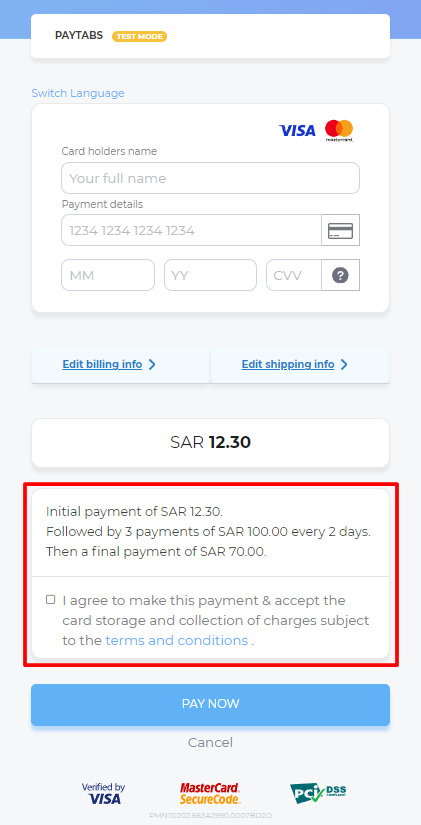
As mentioned in Hosted Payment Page | Payment Workflow, by creating the payment page, you will receive the redirect URL "redirect_url" within the response, which you will use to redirect your client to this payment page. Once you have redirected your client, the client browser will display the following page to the client.
The Merchant Dashboard Page Experience
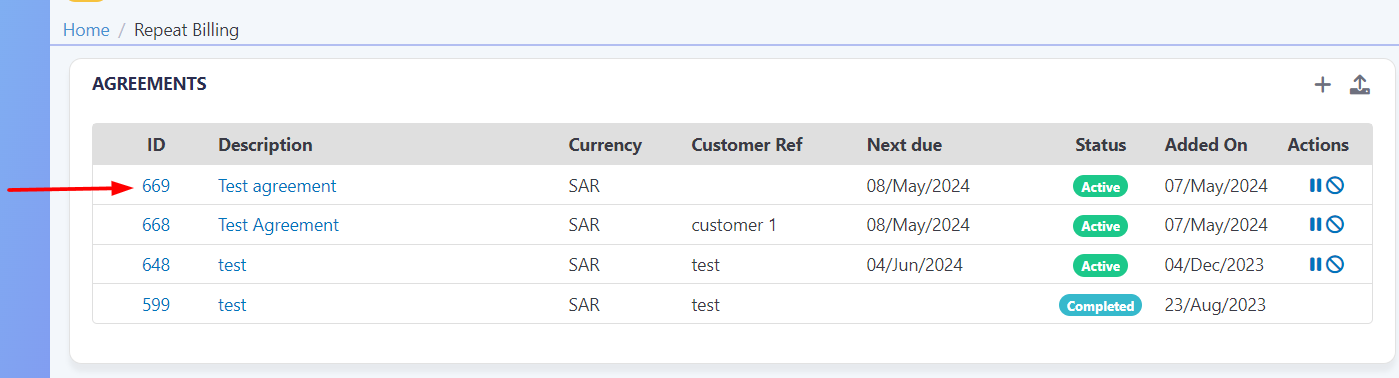
ONCE and ONLY if the customer completes the above payment, a new agreement will be created in your merchant dashboard and you will be able to manage and view all the agreement history, related transactions, and invoices. If you are looking to learn how you can manage your agreement, you should visit ourRepeat Billing & Repeat Invoicingarticle.