Step 2: Initiating a Split Payout Request
The Split Payout feature empowers merchants to allocate funds from a single transaction to multiple beneficiaries. This is ideal for businesses operating in marketplaces, commission-based services, or platforms managing multiple parties. In this guide, we will walk you through the key steps to successfully initiate split payouts using PayTabs APIs.
For a better understanding of the requirements and the whole split payout cycle, we highly recommend you to check our Workflow, Prerequisites & Configurations manuals
The Endpoint and Related Postman Collection
| POST | {{domain}}/payment/request |
|---|
Please note that not using the proper endpoint URL {domain} will lead to authentication issues within your responses. To find the your proper domain you can read ourWhat is my (Region)/(endpoint URL)?tutorial article.
- KSA
- UAE
- Egypt
- Oman
- Jordan
- Kuwait
- Iraq
- Morocco
- Qatar
- Global
https://secure.paytabs.sa/payment/request
https://secure.paytabs.com/payment/request
https://secure-egypt.paytabs.com/payment/request
https://secure-oman.paytabs.com/payment/request
https://secure-jordan.paytabs.com/payment/request
https://secure-kuwait.paytabs.com/payment/request
https://secure-iraq.paytabs.com/payment/request
https://secure-morocco.paytabs.com/payment/request
https://secure-doha.paytabs.com/payment/request
https://secure-global.paytabs.com/payment/request
Request Parameters
To initiate a payment request using this integration type, there are minimum required parameters that need to be passed with valid information. The specification of these required parameters is clarified below:
- The Minimum Required Parameters
- The Available Optional Parameters
| Parameter | | |||
|---|---|---|---|---|
| Description | The merchant Profile ID you can get from your PayTabs dashboard. For more information please check our How to get your account information from PT Dashboard? solution article. To know more about this parameter please click here. | |||
| Data Type | INT STRING | |||
| Required | ✔ | |||
| Validation Rules | Accept only valid profile number. | |||
| Sample | | |||
| Parameter | | |||
| Description | The identification of the type of the transaction.when it comes in the response, it's returned in success only To know more about these types please check our What is the "tran_type" (transaction type)? solution article. To know more about this parameter please click here. | |||
| Data Type | STRING | |||
| Required | ✔ | |||
| Validation Rules | Valid string from this enum list: sale auth void release capture refund register | |||
| Sample | | |||
| Parameter | | |||
| Description | The identification of the category/class this transaction will follow, such as eCommerce, Recurring, etc. To know more about these types please check our What is the "tran_class" (transaction class)? solution article. To know more about this parameter please click here. | |||
| Data Type | STRING | |||
| Required | ✔ | |||
| Validation Rules | Valid string from this list ecom recurring moto | |||
| Sample | | |||
| Parameter | | |||
| Description | Indicates the cart/order id at the merchant end, it should be a unique value at the merchant end. to easily relate the PayTabs transaction to. when it comes in the response, it's returned in success only To know more about this parameter please click here. | |||
| Data Type | STRING | |||
| Required | ✔ | |||
| Min | 1 | |||
| Max | 64 | |||
| Sample | | |||
| Parameter | | |||
| Description | Indicates the cart/order description at the merchant end,it should be something descrips the reason of the transaction at the merchant end, to easily relate the PayTabs transaction to. when it comes in the response, it's returned in success only To know more about this parameter please click here. | |||
| Data Type | STRING | |||
| Required | ✔ | |||
| Min | 1 | |||
| Max | 128 | |||
| Sample | | |||
| Parameter | | |||
| Description | Indicates the transaction currency, which the customer will be charged with. To know more about this parameter please click here. | |||
| Data Type | STRING | |||
| Required | ✔ | |||
| Min | 1 | |||
| Max | 128 | |||
| Validation Rules | Valid string from the following list: SAR AED BHD EGP EUR GBP HKD IDR INR IQD JOD JPY KWD MAD OMR PKR QAR USD Accepts both upper/lower case characters when it comes in the response, it's returned in success only | |||
| Sample | | |||
| Parameter | | |||
| Description | Indicates the amount of the transaction the customer is about to be charged. Both min and max values are subjected to the merchant transaction limits. if param donation_mode is true, cart_amount is not required and will be ignored when it comes in the response, it's returned in success only To know more about this parameter please click here. | |||
| Data Type | int|float|string | |||
| Required | ✔ | |||
| Min | 0.01 | |||
| Max | 9999999999.99 | |||
| Sample | | |||
| OBJECT | - | ||
| The Split Object which contains, the stakeholders of current transaction. If it is defined at least two entities should be provided. | ||||
| ||||
| INT | ✔ | ||
| Unique Entity Id, defined by the merchant | ||||
| ||||
| STRING | ✔ | ||
| Entity name | ||||
| ||||
| STRING | ✔ | ||
| A brief description for the item. | ||||
| ||||
| STRING | ✔ | ||
| The amount that should be paid for related entity. | ||||
| ||||
| STRING | one of the following values:F = Full MSC is applied to this itemP = Proportional MSC is applied to this itemZ = Zero MSCR = Remainder of MSC | ✔ | |
| ||||
| ||||
| OBJECT | ✔ | ||
| Beneficiary details. | ||||
| ||||
| DECIMAL | ✔ | ||
| Beneficiary Name as defined in the bank. | ||||
| ||||
| INT | ✔ | ||
| Beneficiary account (IBAN, VIBAN) . | ||||
| ||||
| STRING | Only valid country code is accepted. | ✔ | |
| Beneficiary Bank’s country. | ||||
| ||||
| STRING | ✔ | ||
| The name of Beneficiary bank. | ||||
| ||||
| STRING | ✔ | ||
| The bank branch. | ||||
| ||||
| STRING | ✔ | ||
| Beneficiary Phone number. | ||||
| ||||
| STRING | ✔ | ||
| Beneficiary email. | ||||
| ||||
| STRING | ✔ | ||
| Beneficiary address. | ||||
| ||||
| DECIMAL | ✔ | ||
| Beneficiary additional address. | ||||
| ||||
| Parameter | | |||
|---|---|---|---|---|
| Description | The merchant Profile ID you can get from your PayTabs dashboard. For more information please check our How to get your account information from PT Dashboard? solution article. To know more about this parameter please click here. | |||
| Data Type | INT STRING | |||
| Required | ✔ | |||
| Validation Rules | Accept only valid profile number. | |||
| Sample | | |||
| Parameter | | |||
| Description | The identification of the type of the transaction.when it comes in the response, it's returned in success only To know more about these types please check our What is the "tran_type" (transaction type)? solution article. To know more about this parameter please click here. | |||
| Data Type | STRING | |||
| Required | ✔ | |||
| Validation Rules | Valid string from this enum list: sale auth void release capture refund register | |||
| Sample | | |||
| Parameter | | |||
| Description | The identification of the category/class this transaction will follow, such as eCommerce, Recurring, etc. To know more about these types please check our What is the "tran_class" (transaction class)? solution article. To know more about this parameter please click here. | |||
| Data Type | STRING | |||
| Required | ✔ | |||
| Validation Rules | Valid string from this list ecom recurring moto | |||
| Sample | | |||
| Parameter | | |||
| Description | Indicates the cart/order id at the merchant end, it should be a unique value at the merchant end. to easily relate the PayTabs transaction to. when it comes in the response, it's returned in success only To know more about this parameter please click here. | |||
| Data Type | STRING | |||
| Required | ✔ | |||
| Min | 1 | |||
| Max | 64 | |||
| Sample | | |||
| Parameter | | |||
| Description | Indicates the cart/order description at the merchant end,it should be something descrips the reason of the transaction at the merchant end, to easily relate the PayTabs transaction to. when it comes in the response, it's returned in success only To know more about this parameter please click here. | |||
| Data Type | STRING | |||
| Required | ✔ | |||
| Min | 1 | |||
| Max | 128 | |||
| Sample | | |||
| Parameter | | |||
| Description | Indicates the transaction currency, which the customer will be charged with. To know more about this parameter please click here. | |||
| Data Type | STRING | |||
| Required | ✔ | |||
| Min | 1 | |||
| Max | 128 | |||
| Validation Rules | Valid string from the following list: SAR AED BHD EGP EUR GBP HKD IDR INR IQD JOD JPY KWD MAD OMR PKR QAR USD Accepts both upper/lower case characters when it comes in the response, it's returned in success only | |||
| Sample | | |||
| Parameter | | |||
| Description | Indicates the amount of the transaction the customer is about to be charged. Both min and max values are subjected to the merchant transaction limits. if param donation_mode is true, cart_amount is not required and will be ignored when it comes in the response, it's returned in success only To know more about this parameter please click here. | |||
| Data Type | int|float|string | |||
| Required | ✔ | |||
| Min | 0.01 | |||
| Max | 9999999999.99 | |||
| Sample | | |||
| Parameter | | |||
| Description | The return URL is the URL that PayTabs will redirect the customer to after he finishes the payment process (whether it's authenticated or not). It will redirect the customer with a POST response that is sent with the client/cardholder redirection through his browser containing the basic transaction information once the payment process ends (whether the customer cancels, paid, or failed to pay). It depends on the customer's actions, which means if the customer closes the browser right after the payment without waiting to be redirected back to your system, you will not receive this response. What is the Return URL vs the Callback URL? To know more about this parameter please click here. | |||
| Data Type | STRING | |||
| Required | ✘ | |||
| Min | N/A | |||
| Max | 255 Characters (Valid URL) | |||
| Validation Rules |
| |||
| Sample | | |||
| Parameter | | |||
| Description | The callback response is a server-to-server POST response that is sent (to a pre-defined HTTPS URL) with the full detailed transaction information once the payment process has ended (whether the customer cancels, paid, or failed to pay). It does not depend on the customer's actions; the response will be sent anyway. What is the Return URL vs the Callback URL? To know more about this parameter please click here. | |||
| Data Type | STRING | |||
| Required | ✘ | |||
| Min | N/A | |||
| Max | 255 Characters (Valid URL) | |||
| Sample | | |||
| Parameter | | |||
| Description | Indicates whether to hide shipping and billing information or not from the payment page. Note: The customer details are still required and must be passed in case any of the details are missing or passed with invalid values; the hide_shipping option will be ignored, and the cardholder will be required to enter any of the missing details on the payment page. To know more about this parameter please click here. | |||
| Data Type | BOOLEAN | |||
| Required | ✘ | |||
| Sample | | |||
| Parameter | | |||
| Description | Indicates the customer shipping details for this payment. If provided, the payment page will be prefilled with the provided data.. | |||
| Data Type | OBJECT | |||
| Required | ✘ | |||
| Sample | | |||
| Parameter | | |||
| Description | Indicates whether to preview the payment page within the current check page instead of redirection or not. If ✔, preview the redirect URL sent in the response in '<iframe>' HTML tag, which will preview the whole payment page within this frame. To know more about this parameter please click here. | |||
| Data Type | BOOLEAN | |||
| Required | ✘ | |||
| Sample | | |||
| Parameter | | |||
| Description | Indicates the payment page displaying language. To know more about this parameter please click here. | |||
| Data Type | STRING | |||
| Required | ✘ | |||
| Validation Rules | Either en or ar or fr | |||
| Sample | | |||
| Parameter | | |||
| Description | Allows you to choose between your list of themes that have been created on your PayTabs dashboard. This chosen theme will be applied to the created payment page. | |||
| Data Type | INT | |||
| Required | ✘ | |||
| Validation Rules | Valid Theme ID (from PayTabs dashboard) | |||
| Sample | | |||
| Parameter | | |||
| Description | For more customizations, you can pass to the Transaction API request your own "user-defined fields" up to 9 fields, and accordingly, you would receive those fields in the callback response. To know more about this parameter please click here. | |||
| Data Type | OBJECT | |||
| Required | ✘ | |||
| Sample | | |||
| Parameter | | |||
| Description | card_filter is one of the optional parameters that the request may have, which will allow you to accept only cards that start with a specific number/identifier/BIN code you want. | |||
| Data Type | STRING | |||
| Required | ✘ | |||
| Min | N/A | |||
| Max | 255 character | |||
| Validation Rules |
| |||
| Sample | | |||
| Parameter | | |||
| Description | The tokenization format the generated token should follow. Token-Based Transactions. To know more about this parameter please click here. | |||
| Data Type | STRING | |||
| Required | ✘ | |||
| Validation Rules | Pass one of the following list:
| |||
| Sample | | |||
| Parameter | | |||
| Description | For showing the “save this card” option on the payment page. To know more about this parameter please click here. | |||
| Data Type | BOOLEAN | |||
| Required | ✘ | |||
| Sample | | |||
| Parameter | | |||
| Description | This parameter will define whether this payment has a predefined amount or the customer will be entering the amount based on the passed cart_min and cart_max. | |||
| Data Type | BOOLEAN | |||
| Required | ✘ | |||
| Sample | | |||
| Parameter | | |||
| Description | Indicates an alternative currency that you want to display your amount with it in your payment page. This will allow you to display the approximate amount of the payment cart amount in this alternative currency for this transaction.. | |||
| Data Type | STRING | |||
| Required | ✘ | |||
| Min | 3 Characters | |||
| Max | 3 Characters | |||
| Validation Rules |
| |||
| Sample | | |||
| Parameter | | |||
| Description | To know more about this parameter please click here. | |||
| Data Type | STRING | |||
| Required | ✘ | |||
| Validation Rules | Pass one or more of the following list: click here | |||
| Sample | | |||
| Parameter | | |||
| Description | token from previously tokenised transaction. To know more about this parameter please click here. | |||
| Data Type | STRING | |||
| Required | ✘ | |||
| Sample | | |||
| Parameter | | |||
| Description | This object will contain the agreement parameters that will specify all the agreement details and options. | |||
| Data Type | OBJECT | |||
| Required | ✘ | |||
| Validation Rules | N/A | |||
| Sample | | |||
| Parameter | | |||
| Description | To provide more customization on token, and modify it if you don't like to use the default one | |||
| Data Type | OBJECT | |||
| Required | ✘ | |||
| Sample | | |||
| Parameter | | |||
| Description | Indicates the customer reference that is provided from the merchant side.when it comes in the response, it's returned in success only | |||
| Data Type | STRING | |||
| Required | ✘ | |||
| Sample | | |||
| Parameter | | |||
| Description | Indicates the merchant's ability to verify the customer's card BIN before proceeding with the transaction. | |||
| Data Type | OBJECT | |||
| Required | ✘ | |||
| Sample | | |||
Request & Response Payload Samples
This section is dedicated give you a sample API request payload using both the above mentioned required and optional parameters, along with showing you the response payload received upon using each request payload.
- Required Parameters Sample Payloads
- Optional Parameters Sample Payloads
The below sample request payload will show you how you can pass the above-mentioned required parameter/s, which are needed to be passed with valid values to perform a request. Along with the response payload received after using this request payload.
- Sample Request Payload
- Sample Response Payload
{
  "profile_id": **Your profile ID**,
  "tran_type": "sale",
  "tran_class": "ecom",
  "cart_id": "cart_11123",
  "cart_currency": "SAR",
  "cart_amount": 158.56,
  "cart_description": "Description of the items/services",
  "split_payout":
  [
      {
          "entity_id": 1000,
          "entity_name": "Restaurant",
          "item_description": "Meal",
          "item_total": "133.56",
          "msc_flag": "p",
          "beneficiary":
          {
              "name": "Customer Name",
              "account_number": "SAXX0X0000XXX000XXXXX000",
              "country": "SA",
              "bank": "bank name",
              "bank_branch": "",
              "email": "[email protected]",
              "mobile_number": "+966XXXXXXXXX",
              "address_1": "Riyadh",
              "address_2": ""
          }
      },
  ],
  "callback": "none",
  "return": "none"
}
{
  "tran_ref": "TST22********159",
  "tran_type": "Sale",
  "cart_id": "CART#1001",
  "cart_description": "Description of the items/services",
  "cart_currency": "AED",
  "cart_amount": "500.00",
  "return": "none",
  "redirect_url": "https://secure.paytabs.com/payment/page/59945B6B********************B481788688",
  "serviceId": 2,
  "profileId": 9*****4,
  "merchantId": 1*****7,
  "trace": "PMN****4.63****A8.00****C4"
}
The below sample request payload will show you how you can pass the above-mentioned optional parameter/s, which are needed to be passed with valid values to perform a request. Along with the response payload received after using this request payload.
- Sample Request Payload
- Sample Response Payload
{
  "profile_id": **Your profile ID**,
  "tran_type": "sale",
  "tran_class": "ecom",
  "cart_description": "Description of the items/services",
  "cart_id": "Unique order reference00",
  "cart_amount": 25000.2,
  "cart_currency": "SAR",
  "paypage_lang": "en",
  "return":"** Valid Return URL **",
  "callback":"** Valid callback URL **",
  "split_payout":
  [
      {
          "entity_id": 1000,
          "entity_name": "Restaurant",
          "item_description": "Meal",
          "item_total": "133.56",
          "msc_flag": "p",
          "beneficiary":
          {
              "name": "Customer Name",
              "account_number": "SAXX0X0000XXX000XXXXX000",
              "country": "SA",
              "bank": "bank name",
              "bank_branch": "",
              "email": "[email protected]",
              "mobile_number": "+966XXXXXXXXX",
              "address_1": "Riyadh",
              "address_2": ""
          }
      },
      {
          "entity_id": 1001,
          "entity_name": "Agency",
          "item_description": "Delivery Fee",
          "item_total": "15.00",
          "msc_flag": "Z",
          "beneficiary":
          {
              "name": "customer name",
              "account_number": "SAXX0X0000XXX000XXXXX000",
              "country": "SA",
              "bank": "bank name",
              "bank_branch": "",
              "email": "[email protected]",
              "mobile_number": "+966XXXXXXXXX",
              "address_1": "Riyadh",
              "address_2": ""
          }
      },
      {
          "entity_id": 1002,
          "entity_name": "Tip",
          "item_description": "Tip",
          "item_total": "10.00",
          "msc_flag": "Z",
          "beneficiary":
          {
              "name": "customer name",
              "account_number": "SAXX0X0000XXX000XXXXX000",
              "country": "SA",
              "bank": "Bank name",
              "bank_branch": "",
              "email": "[email protected]",
              "mobile_number": "+966XXXXXXXXX",
              "address_1": "Riyadh",
              "address_2": ""
          }
      }
  ],
  "customer_details": {
      "name": "FirstName LastName",
      "email": "[email protected]",
      "phone": "0522222222",
      "street1": "address street",
      "city": "cc",
      "state": "C",
      "country": "AE",
      "zip": "12345"
  },
  "shipping_details": {
      "name": "FirstName LastName",
      "email": "[email protected]",
      "phone": "971555555555",
      "street1": "street2",
      "city": "dubai",
      "state": "dubai",
      "country": "AE",
      "zip": "54321"
  },
  "user_defined": {
      "test": "UDF1 Test",
      "test2": "UDF2 Test",
      "udf3": "UDF3 Test",
      "udf4": "UDF4 Test",
      "udf5": "UDF5 Test",
      "udf6": "UDF6 Test",
      "udf7": "UDF7 Test",
      "udf8": "UDF8 Test",
      "udf9": "UDF9 Test"
  },
  "card_discounts":
  [
    {
    "discount_cards" : "41111,520000",
    "discount_amount" : "30.00",
      "discount_percent" : "25",
    "discount_title" : "30.00 SAR and 25% discount on cards starts with 41111, 520000",
    }
  ],
  "config_id": 2188,
  "card_filter": "411111",
  "card_filter_title": "Only accept cards start with 41111",
  "tokenise": 2,
  "show_save_card": true,
  "hide_shipping":true,
  "donation_mode":true,
  "cart_min":5,
  "cart_max":10,
   "framed": true,
  "framed_return_top": true,
  "framed_return_parent": true
}
{
  "tran_ref": "TST223XXXXXXXXXX",
  "tran_type": "Sale",
  "cart_id": "Unique order reference00",
  "cart_description": "Description of the items/services",
  "cart_currency": "USD",
  "cart_amount": "0.00",
  "tran_currency": "",
  "tran_total": "0",
  "callback": "** callback URL **",
  "return": "** return URL **",
  "redirect_url": "https://secure.paytabs.com/payment/page/595AXXXXXXXXXXXXXXXXXXXXXXXXXXXX",
  "customer_details": {
      "name": "first last",
      "email": "[email protected]",
      "phone": "0522222222",
      "street1": "address street",
      "city": "cc",
      "state": "AZ",
      "country": "AE",
      "ip": "197.47.93.193"
  },
  "shipping_details": {
      "name": "name1 last1",
      "email": "[email protected]",
      "phone": "971555555555",
      "street1": "street2",
      "city": "dubai",
      "state": "DU",
      "country": "AE"
  },
  "split_payout":
  [
      {
          "entity_id": 1000,
          "entity_name": "Restaurant",
          "item_description": "Meal",
          "item_total": "133.56",
          "msc_flag": "p",
          "beneficiary":
          {
              "name": "Customer Name",
              "account_number": "SAXX0X0000XXX000XXXXX000",
              "country": "SA",
              "bank": "bank name",
              "bank_branch": "",
              "email": "[email protected]",
              "mobile_number": "+966XXXXXXXXX",
              "address_1": "Riyadh",
              "address_2": ""
          }
      },
      {
          "entity_id": 1001,
          "entity_name": "Agency",
          "item_description": "Delivery Fee",
          "item_total": "15.00",
          "msc_flag": "Z",
          "beneficiary":
          {
              "name": "customer name",
              "account_number": "SAXX0X0000XXX000XXXXX000",
              "country": "SA",
              "bank": "bank name",
              "bank_branch": "",
              "email": "[email protected]",
              "mobile_number": "+966XXXXXXXXX",
              "address_1": "Riyadh",
              "address_2": ""
          }
      },
      {
          "entity_id": 1002,
          "entity_name": "Tip",
          "item_description": "Tip",
          "item_total": "10.00",
          "msc_flag": "Z",
          "beneficiary":
          {
              "name": "customer name",
              "account_number": "SAXX0X0000XXX000XXXXX000",
              "country": "SA",
              "bank": "Bank name",
              "bank_branch": "",
              "email": "[email protected]",
              "mobile_number": "+966XXXXXXXXX",
              "address_1": "Riyadh",
              "address_2": ""
          }
      }
  ],
  "serviceId": 2,
  "profileId": 100181,
  "merchantId": 46656,
  "trace": "PMNT0403.63A99D49.0003A345"
}
The Payment Flow Experience
Reaching this point, you are now able to initiate a Split Payout request and as you now, the process involves several key steps that ensure a smooth payment and tracking experience for both you and customers. Here’s how it works:
-
Initiating the Request:
Once you initiate a split payout request, you will receive a response that includes a redirect URL. This URL is crucial for guiding your customer through the payment process.
"redirect_url": "https://secure.paytabs.com/payment/page/599452E5B6B********************B4817688",
-
Redirecting the Customer:
You should redirect your customer to this URL as you normally would in a payment transaction. This step allows the customer to complete their payment securely and efficiently. PayTabs then will handle the transaction and ensure that the funds are collected as specified in your split payout request.
-
Tracking in the Merchant Dashboard:
After the payment is completed, the transaction will be displayed in your Merchant Dashboard. You can view the details of the split payout in the transaction view. The dashboard will provide a dedicated Split Payout section, showing a comprehensive breakdown of how the funds have been distributed among the designated beneficiaries.
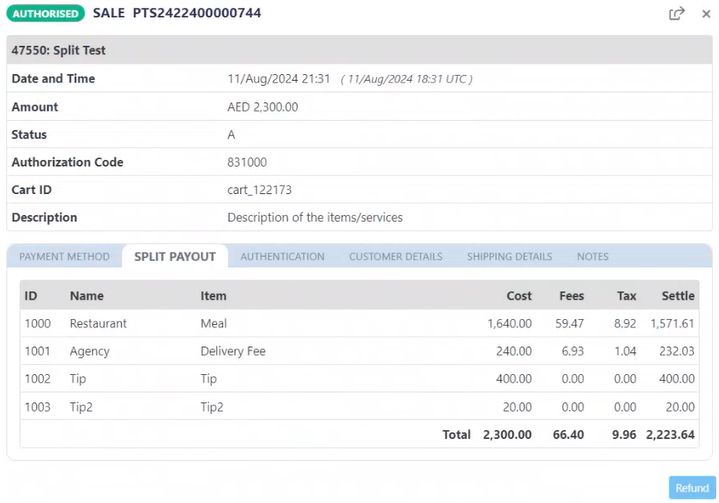
This process ensures that you have full visibility and control over your split payouts, from initiating the transaction to tracking its completion in the dashboard.