Transaction Class (tran_class)
This parameter ONLY working with those integration types (Hosted Payment Page, Managed Form, and Own Form)).
In the evolving landscape of online payments, flexibility and user-centric options are paramount. In PayTabs integrations, the tran_class parameter is used to define how a transaction is processed. It supports multiple values that enable transactions to be handled as standard e-commerce payments, recurring transactions, or MOTO (Mail Order / Telephone Order) transactions, depending on the business requirement.
The Transaction Class parameter is one of the required parameters that you must use while initiating any payment request. It identifies the class of transaction being processed, such as Ecom, Moto, and Recurring. This classification ensures that each transaction is handled according to its specific requirements. For more information please check our What is the "tran_class" (transaction class)? solution article.Not using this parameter correctly will result in your payment being rejected or initiated with a class different from what your business need.
Next, we can delve into the specifics of how to implement the tran_class parameter in your requests.
How this parameter could benefit you?
Here are some scenarios to help you understand when to use the Transaction Class parameter:
- Allow you to use the recurring transactions:The "Recurring" allow returning customers to purchase without re-entering credit card details (recurring) such as monthly subscriptions fees. However, this required to tokenize the customer bank card first through an authorized transaction.
- Improved Tracking and Reporting: By categorizing transactions with the "tran_class" parameter, businesses may find it easier to track and analyze your financial data.
- Using the Ecom value:
Settingtran_classto "ecom" offers these benefits:- Indicates an eCommerce transaction.
- Can be used with the optional parameter "tokenise" to save a transaction token for recurring payments.
- Using the Recurring (Tokenization) value:
Settingtran_classto "recurring" offers these benefits:- Allows returning customers to purchase without re-entering credit card details.
Note: The recurring (tokenization) feature must be enabled on your account (profile) before using it.
- Allows returning customers to purchase without re-entering credit card details.
- Using the Moto value:
Settingtran_classto "moto" offers these benefits:- Allows you to process payments with "Non 3DS" and/or "Non CVV".
- Can be used if you have your client's card saved in your database.
- Allows you to process payments without 3DS for clients who don't have 3DS on their cards.
- The Moto feature must be enabled on your account (profile) before using it.
- TThe Moto feature only works with the "Own Form" request.
- TPCI DSS certification to a minimum of SAQ-D is required to enable the Moto feature.
Name but a few different Businesses/Industries that can benefit from this API parameter:
- E‑Commerce Merchants: Use
tran_classto process standard online card transactions as regular e-commerce payments. - Subscription-Based Services: Supports recurring transactions for services such as SaaS platforms, streaming services, and digital memberships.
- Retail and Point of Sale (POS): Enables classification of transactions initiated through different sales channels, including remote or delayed payments.
- Hospitality and Travel: Hotels and travel agencies can use
tran_classfor recurring transactions such as bookings, deposits, or offline customer confirmations. - Education and Training Platforms: Enables recurring billing for course fees, training subscriptions, or installment-based payments.
- Utilities and Service Providers: Supports recurring or scheduled payments for services such as telecom, internet, or maintenance contracts.
- Insurance and Financial Services: Used to distinguish recurring premiums, customer-initiated payments, or automatic processed transactions.
Limitations
- Profile configuration: For example your profile must configured to accept recurring to use it.
How to Use?
In order for you to start use the tran_ class parameter, you kindly need to follow the below simple steps:
- Within the initiation of the request payload of the payment page/invoice in Step 3 via any of the supported integration types by this parameter, you will use the mandatory parameter
tran_classwithin the main request payload itself as shown below:{
...
"tran_class": "Ecom"
....
} - Once you post your request, for the type
Ecomyou will receive aredirect_urlthat you will need to direct the customer to complete the payment process:{
...
"redirect_url": "https://secure.paytabs.com/payment/page/599458B182E5B6B********************B4818688",
....
} - Finally some transactions type are direct transactions that don't need any further payment process and other will need to you to redirect the customer to a page for either authenticate the cardholder via the 3D Secure or processed with asking to fill the bank card details within the payment page. You may need to check his customer experience after in the coming Expected Payment Flow Behavior.
Parameter Specifications
-
tran_classParameter tran_classDescription The identification of the category/class this transaction will follow, such as eCommerce, Recurring, etc. To know more about these types please check our What is the "tran_class" (transaction class)? solution article.
To know more about this parameter please click here.Data Type STRING Required ✔ Validation Rules Valid string from this list
ecomrecurringmotoSample {
"tran_class": "ecom"
}
Request & Response Payloads Samples
- Hosted Payment Page
- Managed
- Own
The below sample request payload will show you how you can pass the above-mentioned required parameter, which are needed to be passed with valid values to perform a request. Along with the response payload received after using this request payload.
- Request Sample Payload
- Response Sample Payload
{
  "profile_id": 83061,
  "tran_type": "sale",
  "tran_class": "ecom",
  "cart_id": "CART#10001",
  "cart_currency": "SAR",
  "cart_amount": 200,
  "cart_description": "Cart Description"
}
{
    "tran_ref": "TST22********159",
    "cart_type": "Sale",
    "cart_id": "CART#1001",
    "cart_description": "Description of the items/services",
    "cart_currency": "SAR",
    "cart_amount": "500.00",
    "return": "none",
    "redirect_url": "https://secure.paytabs.com/payment/page/599458B182E5B6B********************B4817FD44318539688688",
    "serviceId": 2,
    "profileId": 9*****4,
    "merchantId": 1*****7,
    "trace": "PMN****4.63****A8.00****C4"
}
The below sample request payload will show you how you can pass the above-mentioned required parameter, which are needed to be passed with valid values to perform a request. Along with the response payload received after using this request payload.
- Request Sample Payload
- Response Sample Payload
{
  "profile_id": 83061,
  "tran_type": "sale",
  "tran_class": "ecom",
  "cart_id": "CART#10001",
  "cart_currency": "SAR",
  "cart_amount": 200,
  "cart_description": "Cart Description",
  "customer_details": {
    "name": "Technical Support",
    "email": "[email protected]",
    "phone": "+966 55 xxxxxx6",
    "street1": "address street",
    "city": "Jeddah",
    "state": "Jeddah",
    "country": "SA",
    "zip": "22230"
  },
  "payment_token": "DhDdxmft7x6nkMVzKgtk"
}
{
    "tran_ref": "TST22********159",
    "cart_type": "Sale",
    "cart_id": "CART#1001",
    "cart_description": "Description of the items/services",
    "cart_currency": "SAR",
    "cart_amount": "9.5",
    "return": "none",
    "redirect_url": "https://secure.paytabs.com/payment/page/599458B182E5B6B********************B4817FD44318539688688",
    "serviceId": 2,
    "profileId": 9*****4,
    "merchantId": 1*****7,
    "trace": "PMN****4.63****A8.00****C4"
}
The below sample request payload will show you how you can pass the above-mentioned required parameter, which are needed to be passed with valid values to perform a request. Along with the response payload received after using this request payload.
- Request Sample Payload
- Response Sample Payload
{
  "profile_id": 83061,
  "tran_type": "sale",
  "tran_class": "ecom",
  "cart_id": "CART#10001",
  "cart_currency": "SAR",
  "cart_amount": 200,
  "cart_description": "Cart Description",
  "customer_details": {
    "name": "Technical Support",
    "email": "[email protected]",
    "phone": "+966 55 xxxxxx6",
    "street1": "address street",
    "city": "Jeddah",
    "state": "Jeddah",
    "country": "SA",
    "zip": "22230"
  },
  "card_details": {
    "pan": "4111111111111111",
    "expiry_month": 12,
    "expiry_year": 2029
  }
}
{
    "tran_ref": "TST22********159",
    "cart_type": "Sale",
    "cart_id": "CART#1001",
    "cart_description": "Description of the items/services",
    "cart_currency": "SAR",
    "cart_amount": "9.5",
    "return": "none",
    "redirect_url": "https://secure.paytabs.com/payment/page/599458B182E5B6B********************B4817FD44318539688688",
    "serviceId": 2,
    "profileId": 9*****4,
    "merchantId": 1*****7,
    "trace": "PMN****4.63****A8.00****C4"
}
Expected Payment Flow Behavior
- Ecom
- Recurring
- As mentioned above in the How to use? section, As a merchant you would initiate a payment request per the above Specifications, same as the sample codes mentioned in the samples section above.
However, you will need to pass the valueecomwithin thetran_classparameter. - Then, you will receive a response that includes the same
tran_classyou passed in the request payload, along with the redirect URL. This means you have initiated a correct payment request/page successfully.{
.
"tran_class": "ecom",
"redirect_url": "https://secure.paytabs.com/payment/page/52E5B*********B4818688",
.
} - Next, you should redirect your customer to this URL so the payment process can be finalized.
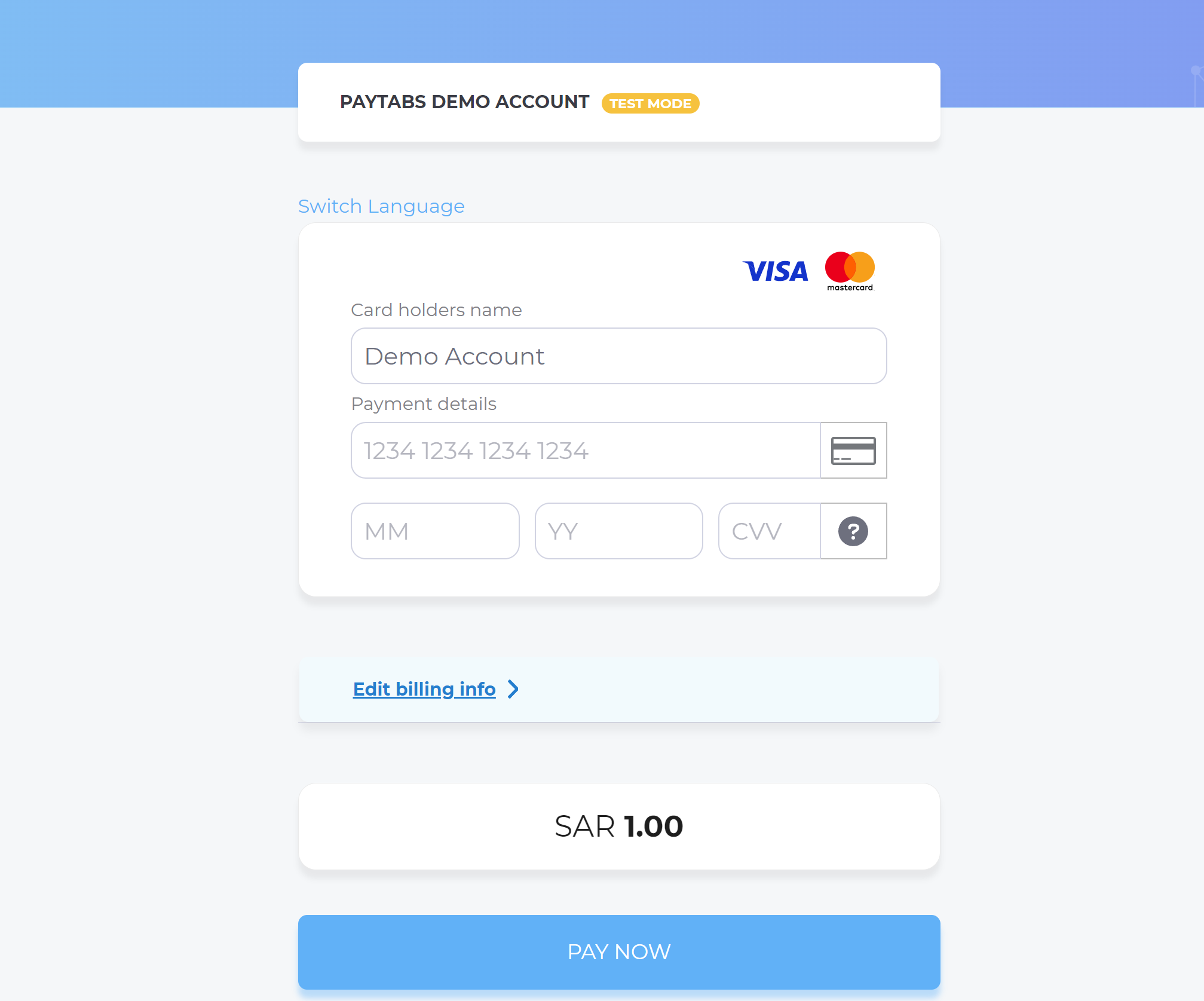
- After this, your customer would proceed normally with payment by choosing the preferred payment method (if available), and providing his card information.
- Then, he will be redirected to his issuer bank 3DS/OTP page to authenticate the used card
- Finally, he would be redirect to a success/error page accordingly. Once he had a successful payment, the payment amount will be directly charged from his issuer bank account and transferred to the acquirer bank account accordingly.
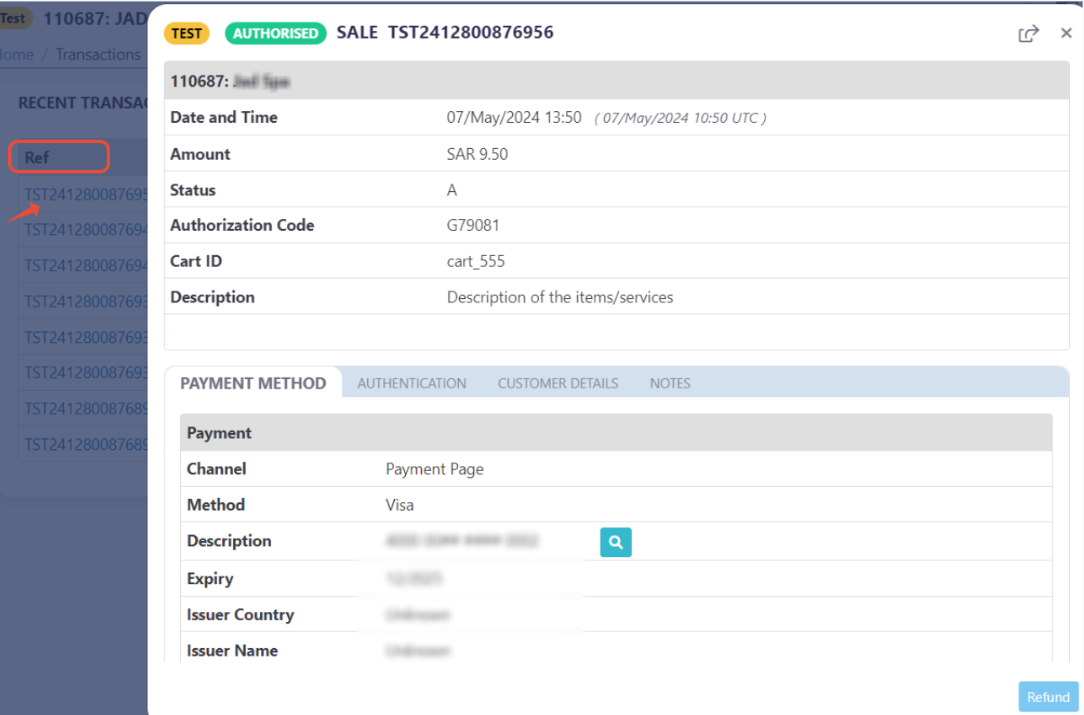
By this time, you will be able to see his transaction on your merchant dashboard, whether it's accepted/authorized or not.
- As mentioned above in the How to use? section, As a merchant you would initiate a payment request per the above Specifications, same as the sample codes mentioned in the samples section above.
However, you will need to pass the valuerecurringwithin thetran_classparameter. Additionally, therecurringtransaction class must be used along with a valid token. Please refer to Token-Based Transactions | Create Token for more details. - Then, you will receive the final response transaction response, as recurring payments are processed as direct deductions.
{
    "payment_result":{
      "response_status":"A",
      "response_code":"G17534",
      "response_message":"Authorised",
      "transaction_time":"20226-11-30T14:12:14Z"
   },
   "payment_info":{
      "payment_method":"Visa",
      "card_type":"Credit",
      "card_scheme":"Visa",
      "payment_description":"41## 11## #### ###1",
      "expiryMonth":12,
      "expiryYear":2027
   },
    .
} - After this, the payment will be processed automatically using the saved token without requiring the customer to re-enter card details, unless additional authentication is required.
- Finally, based on the transaction result, the payment amount will be directly charged from the customer's issuer bank account and transferred to the acquirer bank account accordingly.
By this time, you will be able to see the transaction on your merchant dashboard, whether it's accepted/authorized or not.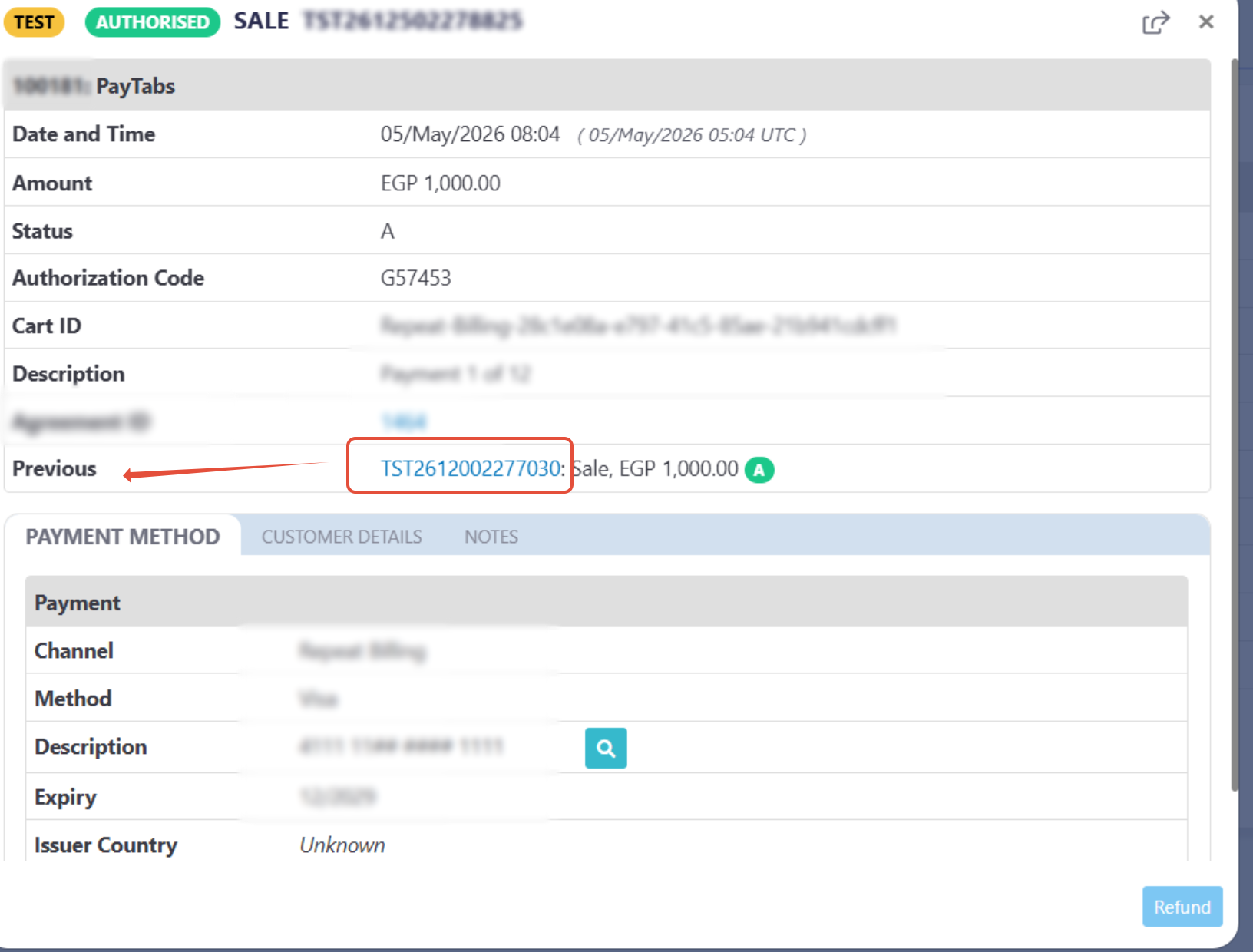
As you can see in the previous screenshot, the transaction with class "recurring" act as a follow up transactions, means there is a previous transactions done to save the token and here how it looks.
redirect_URL to redirect the customer and complete the authentication process. However, the normal flow returns the final response directly without redirection.