Request/Response: User Defined (user_defined)
This parameter ONLY working with those integration types (Hosted Payment Page, Invoices(Payment Endpoint), Invoices, Managed Form, and Own Form).
The User Defined object is one of the required parameters that you must use exclusively with the Own Form integration. It identifies the customer bank card credentials like card number and the expiration date.
The user_defined parameters allow merchants to attach their own custom information to a transaction. These fields are designed to help you store internal references, identifiers, tracking information, or any additional business-specific data that may be useful for reconciliation, reporting, system integrations, and transaction management.
Since PayTabs returns these values in the transaction final response, they provide a convenient way to associate payment records with your internal systems and workflows.
user_defined object in your requests.How this parameter could benefit you?
- Return Additional Metadata: The
user_definedobject allows you to pass additional information related to the transaction that is not covered by the standard request parameters. This can be useful for storing internal references, customer identifiers, order metadata, or any custom values that you want to receive back in transaction responses and callback notifications. - Simplify Transaction Reconciliation: By attaching your own business-specific data to the transaction, you can easily identify and reconcile transactions within your internal systems without relying solely on the standard PayTabs transaction details.
- Maintain Context Across Payment Flows: The values provided within the
user_definedobject are preserved and returned in supported responses, allowing your application to maintain transaction context throughout the payment lifecycle.
Limitations
- Field Limit: The
user_definedobject supports up to 8 user-defined fields. Any additional fields beyond the supported limit may not be processed. - Callback Support Only: The
user_definedvalues are returned as part of the callback notification response, allowing you to receive your custom metadata alongside the transaction details. But not returned in the return URL response after the payment is completed. - Query Transaction API:The
user_definedobject is returned when querying a transaction using the Transaction Reference. However, when querying a transaction using the Cart ID, theuser_definedvalues are not included in the response.
How to Use?
In order for you to start use the user_defined object parameter, you kindly need to follow the below simple steps:
- Within the initiation of the request payload of the payment in Step 3 via ONLY the Own Form integration, you will use the object
user_definedwithin the main request payload itself as shown below:{
"user_defined": {
"udf1": "UDF1 Test",
"udf2": "UDF2 Test",
"udf3": "UDF3 Test",
"udf4": "UDF4 Test",
"udf5": "UDF5 Test",
"udf6": "UDF6 Test",
"udf7": "UDF7 Test",
"udf8": "UDF8 Test",
"udf9": "UDF9 Test"
}
} - Once you post your request, you will receive a response that includes the
payment_infoalong with a redirect URL like the following:{
...
"redirect_url": "https://secure.paytabs.com/payment/page/599458B182E5B6B********************B4818688",
"payment_info": {
"card_type": "Credit",
"card_scheme": "Visa",
"payment_description": "4111 11## #### 1111"
}
....
} - Finally you will need navigate/redirect your customer to the the previous mentioned link as this is crucial for your customer to proceed through the payment 3Ds to authenticate the cardholder. You may need to check the customer experience after in the coming Expected Payment Flow Behavior.
Parameter Specifications
-
user_definedParameter user_definedDescription For more customizations, you can pass to the Transaction API request your own "user-defined fields" up to 9 fields, and accordingly, you would receive those fields in the callback response.
To know more about this parameter please click here.Data Type OBJECT Required ✘ Sample {
"user_defined": {
"udf1": "UDF1 Test",
"udf2": "UDF2 Test",
"udf3": "UDF3 Test",
"udf4": "UDF4 Test",
"udf5": "UDF5 Test",
"udf6": "UDF6 Test",
"udf7": "UDF7 Test",
"udf8": "UDF8 Test",
"udf9": "UDF9 Test"
}
}user_defined's Nested Parameters
Request & Response Payloads Samples
The below sample request payload will show you how you can pass the above-mentioned object, which are needed to be passed with valid values to perform a request. Along with the response payload received after using this request payload.
- Hosted Payment Page
- Invoices
- Managed Form
- Own Form
Click to view the full Request Payload !
{

    "profile_id": "987###",
    "tran_type": "sale",
    "tran_class": "ecom",
    "cart_id": "CART#1001",
    "cart_currency": "SAR",
    "cart_amount": 500,
    "cart_description": "Description of the items/services",
        "user_defined": {
        "udf1": "UDF1 Test",
        "udf2": "UDF2 Test",
        "udf3": "UDF3 Test",
        "udf4": "UDF4 Test",
        "udf5": "UDF5 Test",
        "udf6": "UDF6 Test",
        "udf7": "UDF7 Test",
        "udf8": "UDF8 Test",
        "udf9": "UDF9 Test"
    }
}
Click to view the full Response Payload !
{
                "tran_ref": "TST22********159",
                "tran_type": "Sale",
                "cart_id": "CART#1001",
                "cart_description": "Description of the items/services",
                "cart_currency": "SAR",
                "cart_amount": "500.00",
                "return": "none",
                "redirect_url": "https://secure.paytabs.com/payment/page/599458B182E5B6B********************B4817FD44318539688688",
                "serviceId": 2,
                "profileId": 987###,
                "merchantId": 1*****7,
                "trace": "PMN****4.63****A8.00****C4"
}
Click to view the full Request Payload for both endpoints
{
    "profile_id": "987###",
    "tran_type": "sale",
    "tran_class": "ecom",
    "cart_id": "CART#1001",
    "cart_currency": "SAR",
    "cart_amount": 500,
    "cart_description": "Description of the items/services",

        "user_defined": {
            "udf1": "UDF1 Test",
            "udf2": "UDF2 Test",
            "udf3": "UDF3 Test",
            "udf4": "UDF4 Test",
            "udf5": "UDF5 Test",
            "udf6": "UDF6 Test",
            "udf7": "UDF7 Test",
            "udf8": "UDF8 Test",
            "udf9": "UDF9 Test"
        }
    "invoice": {
            "line_items": [
                {
                    "unit_cost": 100,
                    "quantity":5,
                }

                ]
        }
}
Click to view the full Response Payload via Invoice Endpoint
{
    "invoice_id": 2072841,
    "invoice_link": "https://secure.paytabs.com/payment/request/invoice/2072841/A8CB6A4667A444E79E868206DB76382A"
}
Click to view the full Response Payload via the Payment Endpoint
{
    "tran_ref": "TST22********159",
    "tran_type": "Sale",
    "cart_id": "CART#1001",
    "cart_description": "Description of the items/services",
    "cart_currency": "SAR",
    "cart_amount": "500.00",
    "return": "none",
    "redirect_url": "https://secure.paytabs.com/payment/page/599458B182E5B6B********************B4817FD44318539688688",
    "serviceId": 2,
    "profileId": 987###,
    "merchantId": 1*****7,
    "trace": "PMN****4.63****A8.00****C4"
}
Click to view the full Request Payload !
{
        "profile_id": "987###",
        "tran_type": "sale",
        "tran_class": "ecom",
        "cart_id": "CART#1001",
        "cart_currency": "SAR",
        "cart_amount": 500,
        "cart_description": "Description of the items/services",

        "user_defined": {
            "udf1": "UDF1 Test",
            "udf2": "UDF2 Test",
            "udf3": "UDF3 Test",
            "udf4": "UDF4 Test",
            "udf5": "UDF5 Test",
            "udf6": "UDF6 Test",
            "udf7": "UDF7 Test",
            "udf8": "UDF8 Test",
            "udf9": "UDF9 Test"
        }

        "customer_details": {
        "name": "Demo Account",
        "email": "[email protected]",
        "phone": "+966 0000000000",
        "street1": "address street",
        "city": "city",
        "state": "state",
        "country": "SA",
        "zip": "45555",
        "ip": "1.1.1.1"
    },
    "payment_token": "xxxxxxxxxxxx"

}
Click to view the full Response Payload via 3DS cards !
{
    "tran_ref": "TST22********159",
    "tran_type": "Sale",
    "cart_id": "CART#1001",
    "cart_description": "Description of the items/services",
    "cart_currency": "SAR",
    "cart_amount": "500.00",
    "return": "none",
    "redirect_url": "https://secure.paytabs.com/payment/page/599458B182E5B6B********************B4817FD44318539688688",
        "customer_details": {
        "name": "Demo Account",
        "email": "[email protected]",
        "phone": "+966 0000000000",
        "street1": "address street",
        "city": "city",
        "state": "state",
        "country": "SA",
        "zip": "45555",
        "ip": "1.1.1.1"
     },
    "payment_info": {
        "payment_method": "Visa",
        "card_type": "Credit",
        "card_scheme": "Visa",
        "payment_description": "4111 11## #### 1111",
        "expiryMonth": 12,
        "expiryYear": 2022
    },
    "user_defined": {
        "udf1": "UDF1 Test",
        "udf2": "UDF2 Test",
        "udf3": "UDF3 Test",
        "udf4": "UDF4 Test",
        "udf5": "UDF5 Test",
        "udf6": "UDF6 Test",
        "udf7": "UDF7 Test",
        "udf8": "UDF8 Test",
        "udf9": "UDF9 Test"
    },
    "serviceId": 8,

    "serviceId": 2,
    "profileId": 987###,
    "merchantId": 1*****7,
    "trace": "PMN****4.63****A8.00****C4"
}
Click to view the full Response Payload via Non 3DS cards !
{
    "tran_ref": "TST22********159",
    "tran_type": "Sale",
    "cart_id": "CART#1001",
    "cart_description": "Description of the items/services",
    "cart_currency": "SAR",
    "cart_amount": "500.00",
    "tran_currency": "SAR",
    "tran_total": "500.00",
    "return": "none",
    "customer_details": {
        "name": "Demo Account",
        "email": "[email protected]",
        "phone": "+966 0000000000",
        "street1": "address street",
        "city": "city",
        "state": "state",
        "country": "SA",
        "zip": "45555",
        "ip": "1.1.1.1"
},
    "payment_result": {
    "response_status": "A",
    "response_code": "G17534",
    "response_message": "Authorised",
    "transaction_time": "2022-11-30T14:12:14Z"
    },
    "payment_info": {
    "payment_method": "Visa",
    "card_type": "Credit",
    "card_scheme": "Visa",
    "payment_description": "4111 11## #### 1111",
    "expiryMonth": 12,
    "expiryYear": 2023
    },

    "user_defined": {
        "udf1": "UDF1 Test",
        "udf2": "UDF2 Test",
        "udf3": "UDF3 Test",
        "udf4": "UDF4 Test",
        "udf5": "UDF5 Test",
        "udf6": "UDF6 Test",
        "udf7": "UDF7 Test",
        "udf8": "UDF8 Test",
        "udf9": "UDF9 Test"
    }
    "serviceId": 8,

    "serviceId": 2,
    "profileId": 987###,
    "merchantId": 1*****7,
    "trace": "PMN****4.63****A8.00****C4"
}
Click to view the full Request Payload !
{
        "profile_id": "987###",
        "tran_type": "sale",
        "tran_class": "ecom",
        "cart_id": "CART#1001",
        "cart_currency": "SAR",
        "cart_amount": 500,
        "cart_description": "Description of the items/services",

        "user_defined": {
            "udf1": "UDF1 Test",
            "udf2": "UDF2 Test",
            "udf3": "UDF3 Test",
            "udf4": "UDF4 Test",
            "udf5": "UDF5 Test",
            "udf6": "UDF6 Test",
            "udf7": "UDF7 Test",
            "udf8": "UDF8 Test",
            "udf9": "UDF9 Test"
        }

        "customer_details": {
        "name": "Demo Account",
        "email": "[email protected]",
        "phone": "+966 0000000000",
        "street1": "address street",
        "city": "city",
        "state": "state",
        "country": "SA",
        "zip": "45555",
        "ip": "1.1.1.1"
    },

    "card_details": {
        "pan": "4111111111111111",
        "cvv": "123",
        "expiry_month": 12,
        "expiry_year": 2023
    }

}
Click to view the full Response Payload via 3DS cards !
{
    "tran_ref": "TST22********159",
    "tran_type": "Sale",
    "cart_id": "CART#1001",
    "cart_description": "Description of the items/services",
    "cart_currency": "SAR",
    "cart_amount": "500.00",
    "return": "none",
    "redirect_url": "https://secure.paytabs.com/payment/page/599458B182E5B6B********************B4817FD44318539688688",
        "customer_details": {
        "name": "Demo Account",
        "email": "[email protected]",
        "phone": "+966 0000000000",
        "street1": "address street",
        "city": "city",
        "state": "state",
        "country": "SA",
        "zip": "45555",
        "ip": "1.1.1.1"
     },
    "payment_info": {
        "payment_method": "Visa",
        "card_type": "Credit",
        "card_scheme": "Visa",
        "payment_description": "4111 11## #### 1111",
        "expiryMonth": 12,
        "expiryYear": 2022
    },
    "serviceId": 8,
     "user_defined": {
        "udf1": "UDF1 Test",
        "udf2": "UDF2 Test",
        "udf3": "UDF3 Test",
        "udf4": "UDF4 Test",
        "udf5": "UDF5 Test",
        "udf6": "UDF6 Test",
        "udf7": "UDF7 Test",
        "udf8": "UDF8 Test",
        "udf9": "UDF9 Test"
    }

    "serviceId": 2,
    "profileId": 987###,
    "merchantId": 1*****7,
    "trace": "PMN****4.63****A8.00****C4"
}
Click to view the full Response Payload via Non 3DS cards !
{
    "tran_ref": "TST22********159",
    "tran_type": "Sale",
    "cart_id": "CART#1001",
    "cart_description": "Description of the items/services",
    "cart_currency": "SAR",
    "cart_amount": "500.00",
    "tran_currency": "SAR",
    "tran_total": "500.00",
    "return": "none",
    "customer_details": {
        "name": "Demo Account",
        "email": "[email protected]",
        "phone": "+966 0000000000",
        "street1": "address street",
        "city": "city",
        "state": "state",
        "country": "SA",
        "zip": "45555",
        "ip": "1.1.1.1"
},
    "payment_result": {
    "response_status": "A",
    "response_code": "G17534",
    "response_message": "Authorised",
    "transaction_time": "2022-11-30T14:12:14Z"
    },
    "payment_info": {
    "payment_method": "Visa",
    "card_type": "Credit",
    "card_scheme": "Visa",
    "payment_description": "4111 11## #### 1111",
    "expiryMonth": 12,
    "expiryYear": 2023
    },
    "serviceId": 8,

    "user_defined": {
        "udf1": "UDF1 Test",
        "udf2": "UDF2 Test",
        "udf3": "UDF3 Test",
        "udf4": "UDF4 Test",
        "udf5": "UDF5 Test",
        "udf6": "UDF6 Test",
        "udf7": "UDF7 Test",
        "udf8": "UDF8 Test",
        "udf9": "UDF9 Test"
    },
    "profileId": 987###,
    "merchantId": 1*****7,
    "trace": "PMN****4.63****A8.00****C4"
}
Expected Payment Flow Behavior
- Hosted Payment Page
- Invoices
- Managed Form
- Own Form
- As mentioned above in the How to use? section, As a merchant you would initiate a payment request per the above Specifications, same as the sample codes mentioned in the samples section above.
- Then, you will receive a response that includes the redirect URL. This means you have initiated a correct payment request/page successfully.
{
    .
    .
    "redirect_url": "https://secure.paytabs.com/payment/page/52E5B6B*************B4818688",
    .
    .
} - Next, you should redirect your customer to this URL so the payment process can be finalized.
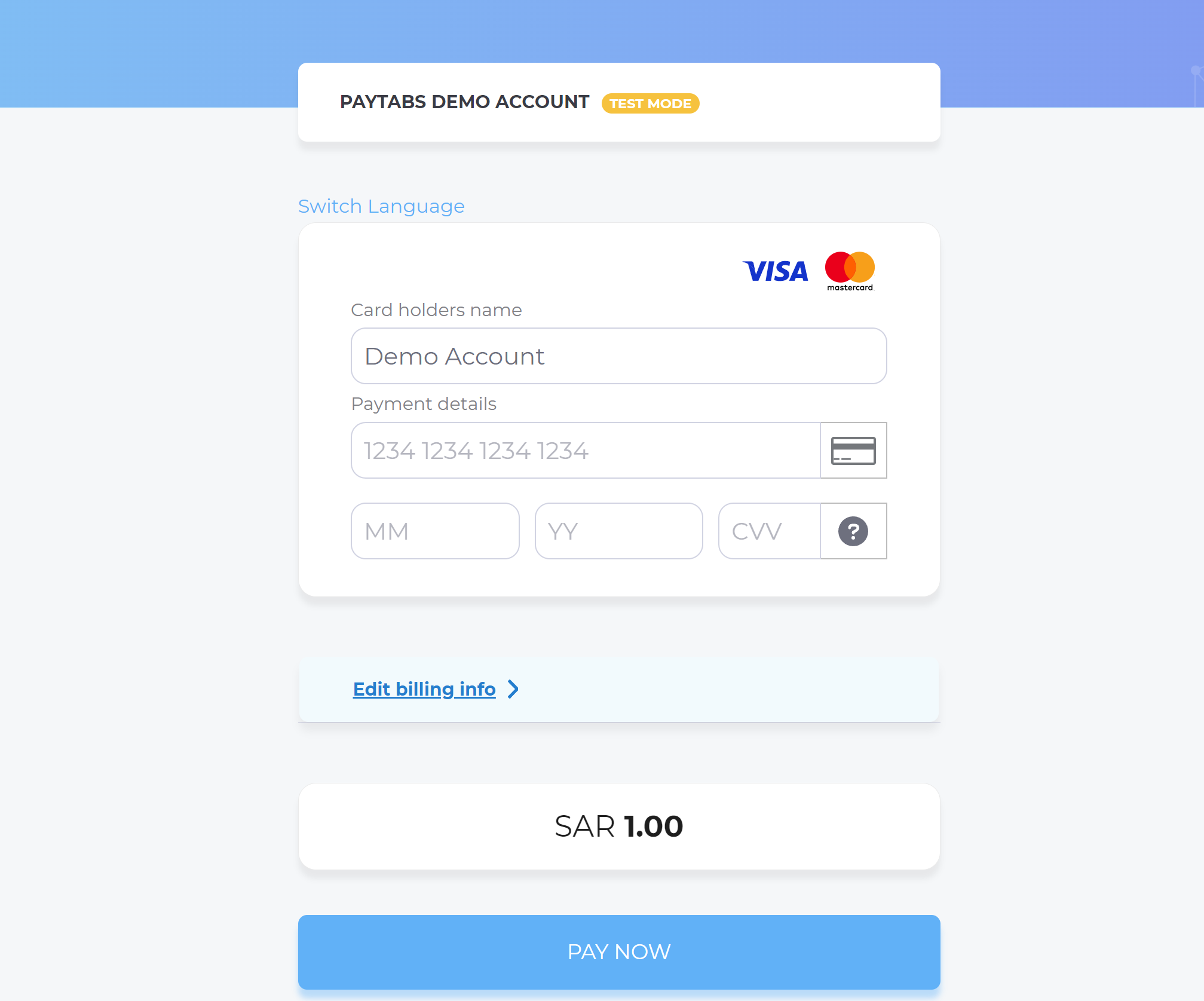
- After this, your customer would proceed normally with payment by choosing the preferred payment method (if available), and providing his card information.
- Then, the customer will be redirected to his issuer bank 3DS/OTP page to authenticate the used card
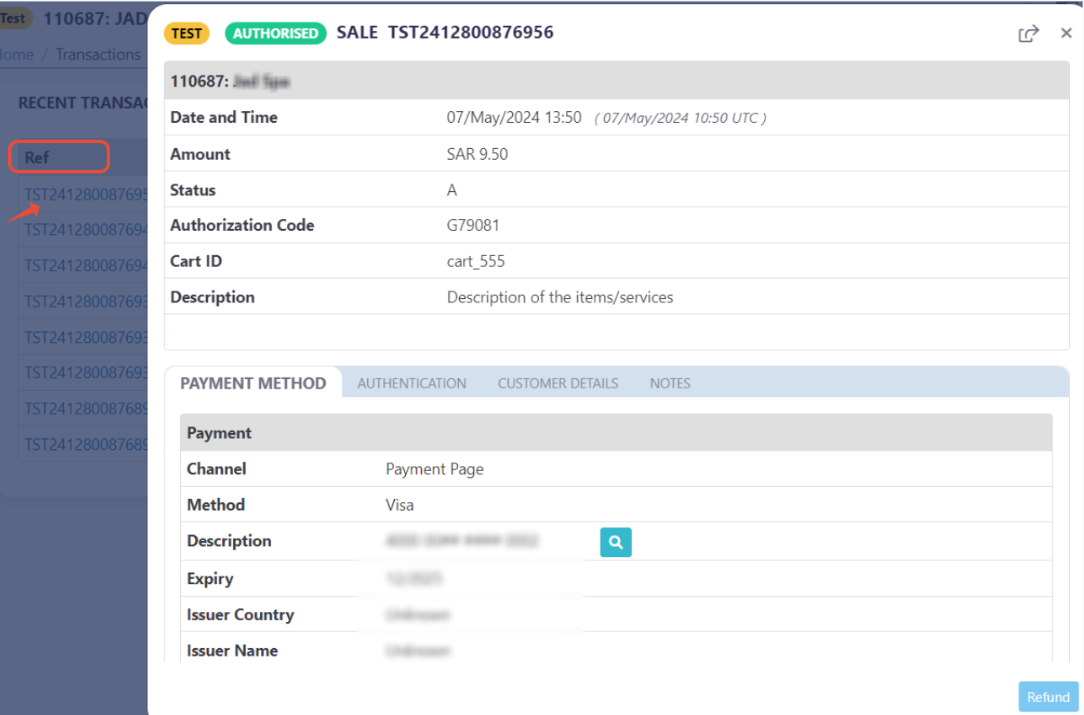
- Finally, the customer would be redirect to a success/error page accordingly. By this time, you will be able to see his transaction on your merchant dashboard, whether it's accepted/authorized or not.

- Also, if you have used the callback or configured IPNIPN in the profile portal, or used the Query Transaction, then you will get the transaction details contained the
user_definedobject details that you have defined while initiated the transaction:{
"tran_ref":"TST250290XXXXXX",
"merchant_id":XXXXX,
"profile_id":XXXX,
............
"user_defined": {
"udf1": "UDF1 Test",
"udf2": "UDF2 Test",
"udf3": "UDF3 Test",
"udf4": "UDF4 Test",
"udf5": "UDF5 Test",
"udf6": "UDF6 Test",
"udf7": "UDF7 Test",
"udf8": "UDF8 Test",
"udf9": "UDF9 Test"
}
}
- As mentioned above in the How to use? section, As a merchant you would initiate a payment request per the above Specifications, same as the sample codes mentioned in the samples section above.
- Then, you will receive a response that includes the redirect URL. This means you have initiated a correct payment request/page successfully.
"redirect_url": "https://secure.paytabs.com/payment/page/5995B6B*************B4818688", - In the meantime, your invoice would be already created on your dashboard, which you can access from your merchant dashboard.

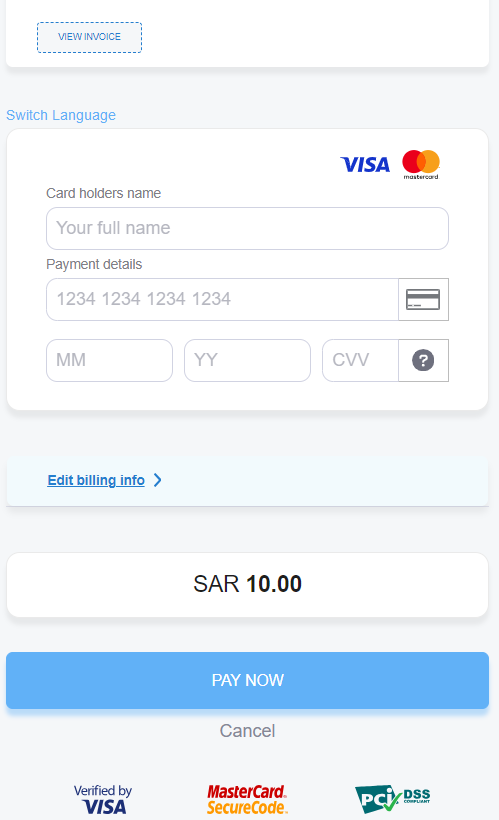
- After this, your customer would proceed normally with payment by providing his card information.
- Then, he will be redirected to his issuer bank 3DS/OTP page to authenticate the used card
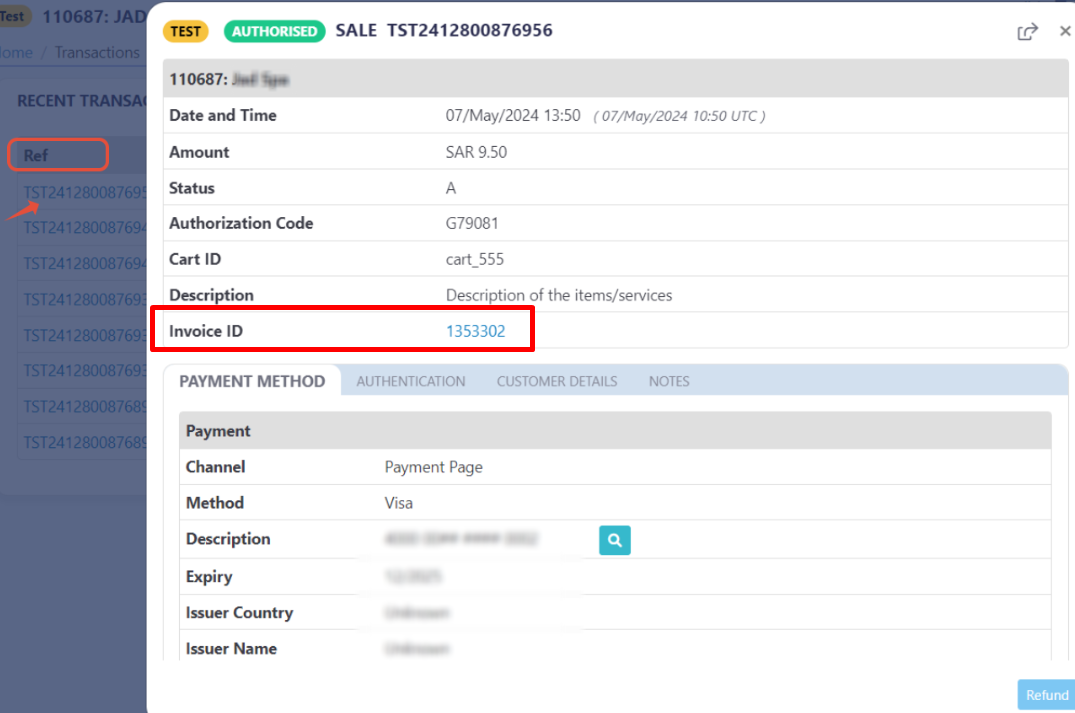
- Finally, he would be redirect to a success/error page accordingly. By this time, you will be able to see his transaction on your merchant dashboard, whether it's accepted/authorized or not. Only successful payments will be connected to the invoice itself in the invoice record.

- Also, if you have used the callback or configured IPNIPN in the profile portal, or used the Query Transaction, then you will get the transaction details contained the
user_definedobject details that you have defined while initiated the transaction:{
"tran_ref":"TST250290XXXXXX",
"merchant_id":XXXXX,
"profile_id":XXXX,
............
"user_defined": {
"udf1": "UDF1 Test",
"udf2": "UDF2 Test",
"udf3": "UDF3 Test",
"udf4": "UDF4 Test",
"udf5": "UDF5 Test",
"udf6": "UDF6 Test",
"udf7": "UDF7 Test",
"udf8": "UDF8 Test",
"udf9": "UDF9 Test"
}
}
- As mentioned above in the How to use? section, as a merchant you would initiate a payment request per the above Specifications, same as the sample codes mentioned in the samples section above.
- Then, you will receive a response that includes redirect URL. This means you have initiated a correct payment request/page successfully.
"redirect_url": "https://secure.paytabs.com/payment/page/599458B6B********B4818688", - Then, your customer will be redirected to his issuer bank 3DS/OTP page to authenticate the used card
- Finally, he would be redirect to a success/error page accordingly. And now, you will be able to see his transaction on your merchant dashboard, whether it's accepted/authorized or not.
- Also, if you have used the callback or configured IPNIPN in the profile portal, or used the Query Transaction, then you will get the transaction details contained the
user_definedobject details that you have defined while initiated the transaction:{
"tran_ref":"TST250290XXXXXX",
"merchant_id":XXXXX,
"profile_id":XXXX,
............
"user_defined": {
"udf1": "UDF1 Test",
"udf2": "UDF2 Test",
"udf3": "UDF3 Test",
"udf4": "UDF4 Test",
"udf5": "UDF5 Test",
"udf6": "UDF6 Test",
"udf7": "UDF7 Test",
"udf8": "UDF8 Test",
"udf9": "UDF9 Test"
}
}
- As mentioned above in the How to use? section, as a merchant you would initiate a payment request per the above Specifications, same as the sample codes mentioned in the samples section above.
- Then, you will receive a response that includes redirect URL. This means you have initiated a correct payment request/page successfully.
"redirect_url": "https://secure.paytabs.com/payment/page/599458B6B********B4818688", - Then, your customer will be redirected to his issuer bank 3DS/OTP page to authenticate the used card
- Finally, he would be redirect to a success/error page accordingly. And now, you will be able to see his transaction on your merchant dashboard, whether it's accepted/authorized or not.
- Also, if you have used the callback or configured IPNIPN in the profile portal, or used the Query Transaction, then you will get the transaction details contained the
user_definedobject details that you have defined while initiated the transaction:{
"tran_ref":"TST250290XXXXXX",
"merchant_id":XXXXX,
"profile_id":XXXX,
............
"user_defined": {
"udf1": "UDF1 Test",
"udf2": "UDF2 Test",
"udf3": "UDF3 Test",
"udf4": "UDF4 Test",
"udf5": "UDF5 Test",
"udf6": "UDF6 Test",
"udf7": "UDF7 Test",
"udf8": "UDF8 Test",
"udf9": "UDF9 Test"
}
}