Reterive Report List
PayTabs provides you with a collection of API endpoints which used to process all payments, regardless of if they are through either your own payment pages, the managed payment pages, or if you are using the hosted payment pages.
Reports is a powerful feature designed to help merchants monitor and analyze their transaction flow. By using Reports, merchants gain the ability to access bulk transaction data in detail, making it easier to track payment activity, review order histories, and ensure smooth business operations.
After setting up the report details in the Dashboard, you can use the Reports API to retrieve all available reports, with a maximum of 30 latest reports. These will include the initial details such as report dates and type (e.g., weekly, monthly, etc.).
Let’s go through the following sections to learn how to do this.The Endpoint and Related Postman Collection
In this tutorial, we will rely on the PayTabs Get All Reports Transaction API Endpoint, mentioned on the PayTabs API endpoints postman collection, which you can access fromhere. he endpoint will need to be accessed with the mentioned HTTP request via the below URL endpoint:
| GET | {{domain}}/report/[PROFILE_ID]/list |
|---|
Please note that not using the proper endpoint URL {domain} will lead to authentication issues within your responses. To find the your proper domain you can read ourWhat is my (Region)/(endpoint URL)?tutorial article.
- KSA
- UAE
- Egypt
- Oman
- Jordan
- Kuwait
- Iraq
- Morocco
- Qatar
- Global
https://secure.paytabs.sa/report/[PROFILE_ID]/list
https://secure.paytabs.com/report/[PROFILE_ID]/list
https://secure-egypt.paytabs.com/report/[PROFILE_ID]/list
https://secure-oman.paytabs.com/report/[PROFILE_ID]/list
https://secure-jordan.paytabs.com/report/[PROFILE_ID]/list
https://secure-kuwait.paytabs.com/report/[PROFILE_ID]/list
https://secure-iraq.paytabs.com/report/[PROFILE_ID]/list
https://secure-morocco.paytabs.com/report/[PROFILE_ID]/list
https://secure-doha.paytabs.com/report/[PROFILE_ID]/list
https://secure-global.paytabs.com/report/[PROFILE_ID]/list
The Minimum Required Parameters
To initiate a get list of report request, there are minimum required parameters that need to be passed with valid information. The specification of these required parameters is clarified below according to the query type:
- Via Get Request
In the GET report List, we simply use a GET request passing only the Profile_id as a param in the endpoint URL to get the List of Reports. As shown in the below sample request.
| Parameter | Data Type | Min | Max | Required |
|---|---|---|---|---|
| INT STRING | Accept only valid profile number. | ✔ | |
| The merchant Profile ID you can get from your PayTabs dashboard. For more information please check our How to get your account information from PT Dashboard? solution article. To know more about this parameter please click here. | ||||
| ||||
Sample Request/Response Payloads
- Sample Request Payload
- Sample Response Payload
As mention before, for get request, you only need to pass the Profile_id and the server key to API key.
- Via Postman
- Via cURL
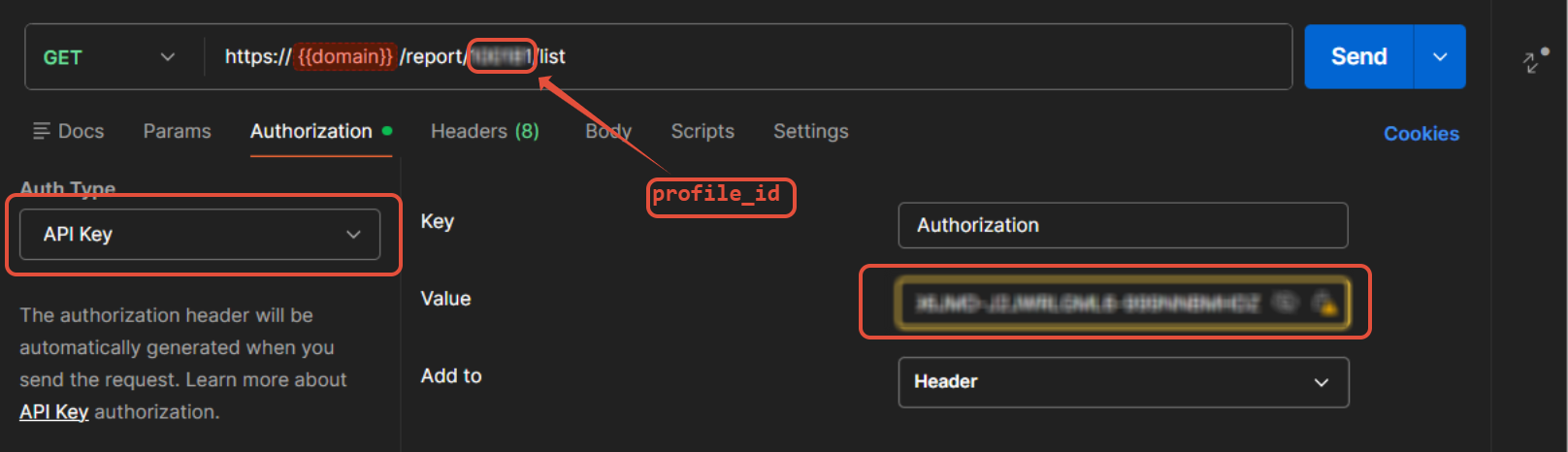
curl --location --request GET 'https://secure.paytabs.com/payment/report/[PROFILE_ID]/list'

--header 'Authorization: SGJNBXXXXX-J6RNNXXXXX-2ZGWLXXXXX'
If you already set reports, you will see the following:
{
"profileID": 10XXX1,
"reportCount": 30,
"reports": [
{
    "reportID": 333XXXX,
    "title": "Daily Transaction Report",
    "dateFrom": "2025-12-28",
    "dateTo": "2025-12-28",
    "generatedOn": "2025-12-29T04:49:43Z",
    "filename": ""
},
{
    "reportID": 333XXXX,
    "title": "Weekly Transaction Report",
    "dateFrom": "2025-12-22",
    "dateTo": "2025-12-28",
    "generatedOn": "2025-12-29T04:04:43Z",
    "transactions": 20,
    "filename": "weekly_report_3334356.csv"
},
{
    "reportID": 3332XXX,
    "title": "Daily Transaction Report",
    "dateFrom": "2025-12-27",
    "dateTo": "2025-12-27",
    "generatedOn": "2025-12-28T05:04:43Z",
    "filename": ""
},
{
    "reportID": 3330XXX,
    "title": "Daily Transaction Report",
    "dateFrom": "2025-12-26",
    "dateTo": "2025-12-26",
    "generatedOn": "2025-12-27T04:44:43Z",
    "filename": ""
},
{
    "reportID": 3329XXX,
    "title": "Daily Transaction Report",
    "dateFrom": "2025-12-25",
    "dateTo": "2025-12-25",
    "generatedOn": "2025-12-26T04:44:43Z",
    "transactions": 6,
    "filename": "daily_report_3329114.csv"
},
.....
....
]

}
Expected Flow Behavior
To Reterive the Report List successfully, find the following steps for clear guidance:
- First of all, this endpoint is a management endpoint. You need to ensure that you have already created an active layout from the merchant dashboard, referring back to Step 1: Understanding Workflow and Prerequisites.
The reports will begin generating automatically in the Reports menu and will appear as shown below:
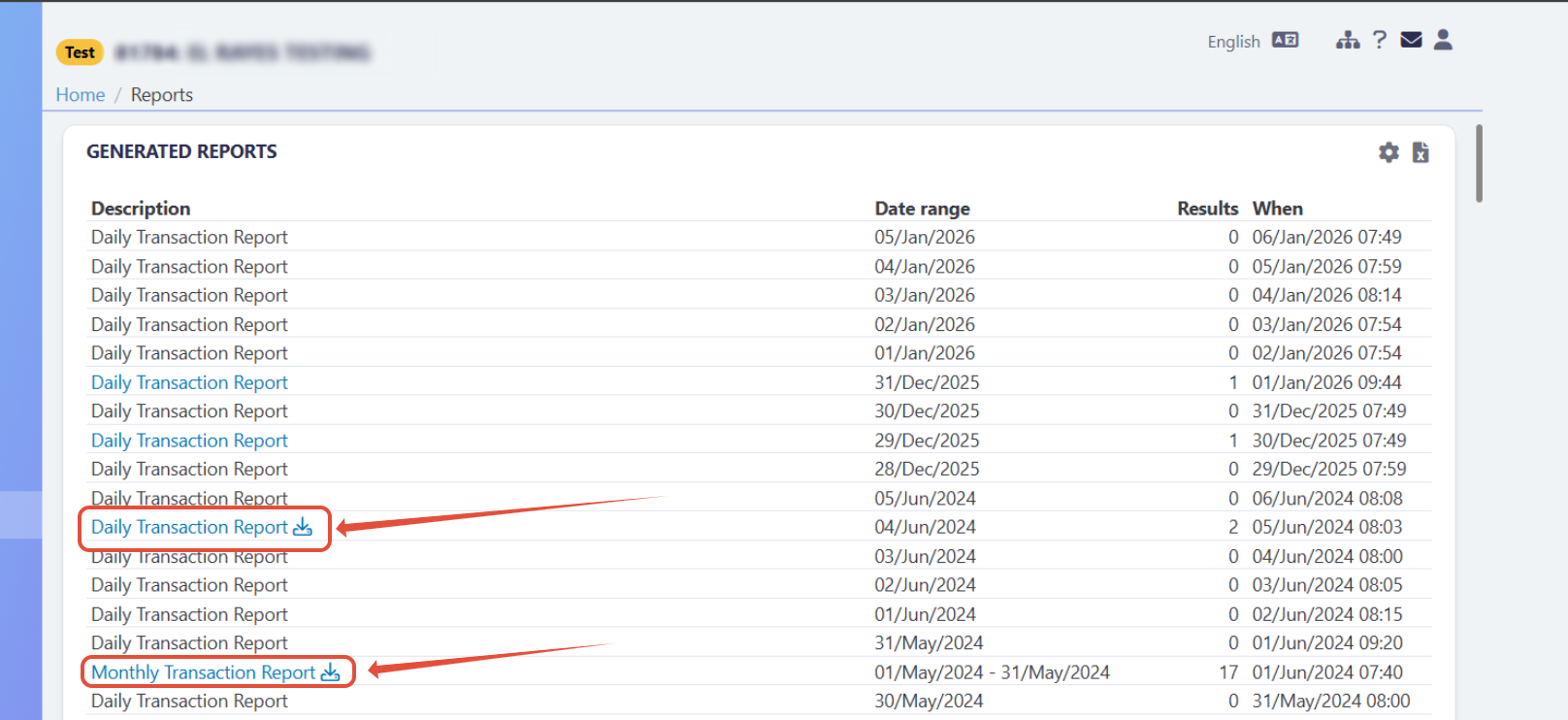
Once generation begins, you can start using this endpoint with your
profile ID, following the steps outlined here: Minimum Required Parameters.- In the successful case, you will receive a report list as expected, similar to the response payload shownhere.
However, if an error occurs during report generation or if you created a monthly layout that has not yet been generated, you will see the following:
{
    "profileID": 136935,
    "reportCount": 0
}