Cancel Invoice
An invoice is a document you provide to your client after they purchase goods or services from you. It serves to both record the sale and request payment. For detailed information about PayTabs invoices, please refer to our articleWhat is PayTabs Invoice?
In this manual, we will guide you on the correct method to change the status of any invoice to "canceled" using the specified endpoint. We strongly recommend that you and your team review theInvoices | Payment Workflowmanual first to grasp the business logic behind this integration type.
The Endpoint and Related Postman Collection
In this tutorial, we will rely on the PayTabs cancel Transaction API Endpoint, mentioned on the PayTabs API endpoints postman collection, which you can access fromhere.The endpoint will need to be accessed with the mentioned HTTP request via the below URL endpoint:
- Via PUT Request
- Via POST Request
| PUT | {{domain}}/payment/invoice/{{invoice_id}}/cancel |
|---|
Please note that not using the proper endpoint URL {domain} will lead to authentication issues within your responses. To find the your proper domain you can read ourWhat is my (Region)/(endpoint URL)?tutorial article.
- KSA
- UAE
- Egypt
- Oman
- Jordan
- Kuwait
- Iraq
- Morocco
- Qatar
- Global
https://secure.paytabs.sa/payment/invoice/{{invoice_id}}/cancel
https://secure.paytabs.com/payment/invoice/{{invoice_id}}/cancel
https://secure-egypt.paytabs.com/payment/invoice/{{invoice_id}}/cancel
https://secure-oman.paytabs.com/payment/invoice/{{invoice_id}}/cancel
https://secure-jordan.paytabs.com/payment/invoice/{{invoice_id}}/cancel
https://secure-kuwait.paytabs.com/payment/invoice/{{invoice_id}}/cancel
https://secure-iraq.paytabs.com/payment/invoice/{{invoice_id}}/cancel
https://secure-morocco.paytabs.com/payment/invoice/{{invoice_id}}/cancel
https://secure-doha.paytabs.com/payment/invoice/{{invoice_id}}/cancel
https://secure-global.paytabs.com/payment/invoice/{{invoice_id}}/cancel
| POST | {{domain}}/payment/invoice/cancel |
|---|
Please note that not using the proper endpoint URL {domain} will lead to authentication issues within your responses. To find the your proper domain you can read ourWhat is my (Region)/(endpoint URL)?tutorial article.
- KSA
- UAE
- Egypt
- Oman
- Jordan
- Kuwait
- Iraq
- Morocco
- Qatar
- Global
https://secure.paytabs.sa/payment/invoice/cancel
https://secure.paytabs.com/payment/invoice/cancel
https://secure-egypt.paytabs.com/payment/invoice/cancel
https://secure-oman.paytabs.com/payment/invoice/cancel
https://secure-jordan.paytabs.com/payment/invoice/cancel
https://secure-kuwait.paytabs.com/payment/invoice/cancel
https://secure-iraq.paytabs.com/payment/invoice/cancel
https://secure-morocco.paytabs.com/payment/invoice/cancel
https://secure-doha.paytabs.com/payment/invoice/cancel
https://secure-global.paytabs.com/payment/invoice/cancel
How to Cancel Invoice ?
In order for you to start using the cancel feature, you need to follow the below simple steps:
Once an invoice is initiated, it is automatically assigned the
"pending"status. The invoice remains in this state until it is either successfully paid, after which its status becomes"paid", or it is explicitly canceled, changing its status to"canceled".This article explains the correct way to change the status of a specific invoice using the Invoice Cancel request. Please note that an invoice can only be canceled if its current status is
"pending". Invoices with a status of"paid"or"canceled"cannot be canceled.To perform the cancel operation, you will need the
profile_idand theinvoice_id. When sending thePUTrequest to the cancel endpoint, only theinvoice_idis required in the request payload.
The Minimum Required Parameters
To initiate a query invoice request, there are minimum required parameters that need to be passed with valid information. The specification of these required parameters is clarified below according to the query type:
- Via Put Request
- Via Post Request
In the PUT request type, you can cancel the status by sending a PUT request with only the { invoice_id } as a parameter in the URL. Below is a sample request that demonstrates how to cancel an invoice with the ID "2075865."
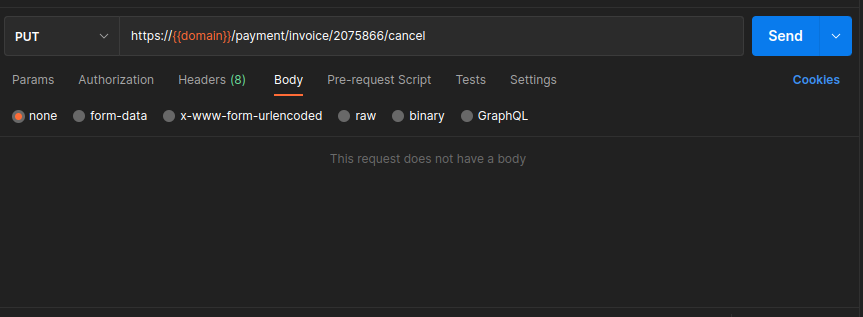
In the POST request type, we simply use a POST request with only the "invoice_id" and "profile_id" as payload parameters to cancel the invoice. As shown below
| Parameter | Data Type | Required | Purpose |
|---|---|---|---|
| INT | ✔ | The merchant Profile ID you can get from your PayTabs dashboard. For more information please check ourHow to get your account information from PT Dashboard?tutorial article. To know more about this parameter please click here profile_id. |
| |||
| INT | ✔ | Indicates the invoice reference you want to query. To know more about this parameter please click here invoice . |
| |||
Request & Response Payload Samples
This section is dedicated give you a sample API request payload using the above mentioned required parameters, along with showing you the response payload received upon using the request payload.
- Required Parameters Sample Payloads
The below sample request payload will show you how you can pass the above-mentioned required parameter/s, which are needed to be passed with valid values to perform a request. Along with the response payload received after using this request payload.
- Sample Request Payload
- Sample Response Payload
- Via Put Request
- Via Post Request
As we mentioned before, you can cancel the status by sending a PUT request with only the { invoice_id } as a parameter in the URL. Below is a sample request that demonstrates how to cancel an invoice with the ID "2075865."
For post request, you need to set as usual the API key and the profile ID in the request as shown below:
{
  "profile_id": 79010,
  "invoice_id": {{invoice_id}}
}
{
"message": "Invoice has been cancelled"
}
Expected Flow Behavior
To cancel a specific invoice, follow the steps below. This flow assumes that you have already
initiated an invoice and received a valid invoice_id.
The cancel operation only succeeds if the invoice status is "pending".
Attempting to cancel invoices that are already "canceled" or "paid"
will fail, check the following sections for more details on the expected behavior in such cases:
Initiate the cancel step by sending a request to the cancel endpoint with the
invoice_idof the invoice you want to cancel. Details can be found here: Request Parameters.At this stage, the response depends on the current status of the invoice:
If the invoice is pending:
Success response.{
"message": "Invoice has been cancelled"
}If the invoice is already canceled or paid: a 400 error is returned.
When attempting to cancel an invoice that is already canceled or paid, the API returns a 500 Internal Server Error.
- 500 Internal Server Error
The API responds with a 500 Internal Server Error, indicating that the invoice cannot be canceled.
{
"code": 400,
"message": "Unable to cancel invoice",
"trace": "PMNT0402.69D17E32.000C04E6"
}