Search Invoices List
An invoice is a document you provide to your client after they purchase goods or services from you. It serves to both record the sale and request payment. For detailed information about PayTabs invoices, please refer to our articleWhat is PayTabs Invoice?
After your invoices are created and exist in the system, you may need to retrieve a list based on their creation date, regardless of their status: "paid," "pending," or "canceled." This article specifically explains the correct method for searching and retrieving invoice lists using the creation date through the designated API endpoint. Before proceeding with this integration, we strongly recommend reviewing theInvoices | Payment Workflowmanual to understand the business logic behind this process.
The Endpoint and Related Postman Collection
In this tutorial, we will rely on the PayTabs Search Invoice List Transaction API Endpoint, mentioned on the PayTabs API endpoints postman collection, which you can access fromhere. he endpoint will need to be accessed with the mentioned HTTP request via the below URL endpoint:
| POST | {{domain}}/payment/invoice/search |
|---|
Please note that not using the proper endpoint URL {domain} will lead to authentication issues within your responses. To find the your proper domain you can read ourWhat is my (Region)/(endpoint URL)?tutorial article.
- KSA
- UAE
- Egypt
- Oman
- Jordan
- Kuwait
- Iraq
- Morocco
- Qatar
- Global
https://secure.paytabs.sa/payment/invoice/search
https://secure.paytabs.com/payment/invoice/search
https://secure-egypt.paytabs.com/payment/invoice/search
https://secure-oman.paytabs.com/payment/invoice/search
https://secure-jordan.paytabs.com/payment/invoice/search
https://secure-kuwait.paytabs.com/payment/invoice/search
https://secure-iraq.paytabs.com/payment/invoice/search
https://secure-morocco.paytabs.com/payment/invoice/search
https://secure-doha.paytabs.com/payment/invoice/search
https://secure-global.paytabs.com/payment/invoice/search
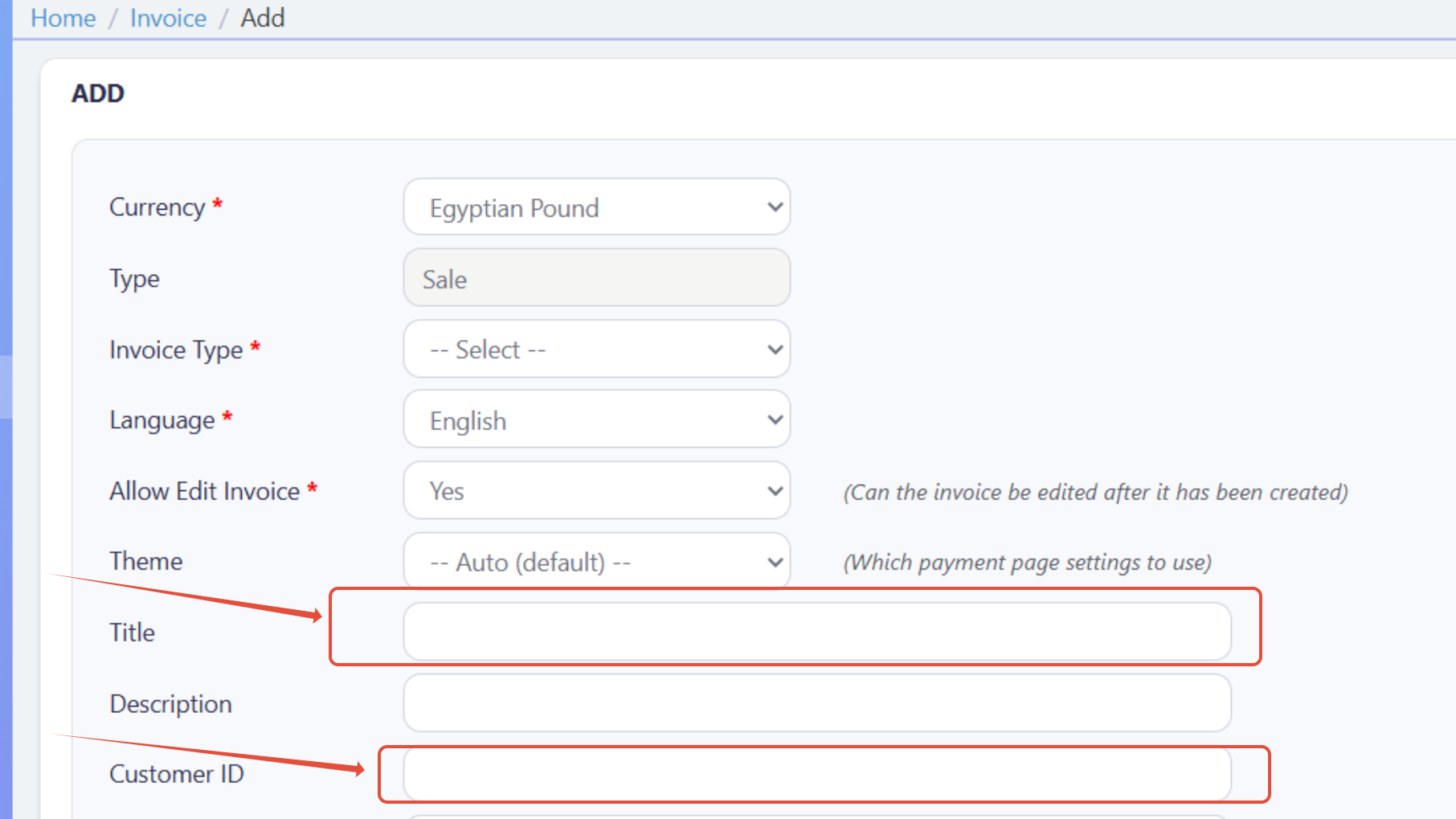
If you created the invoice from the dashboard, cart_id corresponds to the title field, and customer_ref represents the customer ID in the dashboard fields.
How to Search For Invoice/s?
In order for you to start use the invoice search feature, you need to follow the below simple steps:
To search for invoices, you may use only the
profile_idin your request. In this case, the system will return invoices from the last 45 days, counted from today.If you choose to use
Created_date_from, you must also includecreated_date_to. The interval between them must not exceed 45 days (it may be less).{
"profile_id": 123456,
"created_date_from": "01/02/2025",
"created_date_to": "15/03/2025"
}If the invoice is older than 45 days and you know the
customer_ref, you must provideCreated_date_fromandcreated_date_toas well, ensuring the chosen date range roughly matches the invoice period.{
"profile_id": 123456,
"customer_ref": "CUST-8899",
"created_date_from": "01/09/2024",
"created_date_to": "20/09/2024"
}Similarly, if you know the
cart_idof an invoice older than 45 days, you must includeCreated_date_fromandcreated_date_towith an approximate matching period.{
"profile_id": 123456,
"cart_id": "CART-5588",
"created_date_from": "10/08/2024",
"created_date_to": "25/08/2024"
}If the invoice you are searching for (via
cart_idorcustomer_ref) was created within the last 45 days, you do not need to includeCreated_date_fromorcreated_date_to.{
"profile_id": 123456,
"cart_id": "CART-1122"
}Once the request is submitted, you will receive an array of invoices if matching records exist. Otherwise, the response will return:
"No matching invoices found".
You can use any of those parameters customer_ref, and cart_id, to filter the search results, but not together.
If you use both of them in the same search request, you will get the error: 422 Unprocessable Entity.
{
  "code": 2,
  "message": "Invalid search parameters. Please provide either 'customer_ref' or 'cart_id', not both, for search operation.",
  "trace": "PMN######.682######.000######"
}
Request Parameters
To make a retrieve invoice details request, there are required/optional parameter/s that need to be passed with valid information. The specification of these required parameters is clarified below according to the request type:
- The Minimum Required Parameters
- The Available Optional Parameters
You can search using the profile ID only; however, the results will include data from the latest 45 days, starting from the date the request is retrieved.
| Parameter | Data Type | Min | Max | Required |
|---|---|---|---|---|
| INT STRING | Accept only valid profile number. | ✔ | |
| The merchant Profile ID you can get from your PayTabs dashboard. For more information please check our How to get your account information from PT Dashboard? solution article. To know more about this parameter please click here. | ||||
| ||||
- Via Customer Reference
- Via Cart ID
As cannot use customer_ref and cart_id together, here is how to use customer_ref
| Parameter | Data Type | Min | Max | Required |
|---|---|---|---|---|
| INT STRING | Accept only valid profile number. | ✔ | |
| The merchant Profile ID you can get from your PayTabs dashboard. For more information please check our How to get your account information from PT Dashboard? solution article. To know more about this parameter please click here. | ||||
| ||||
| Parameter | Data Type | Min | Max | Required |
|---|---|---|---|---|
| DATE | An optional parameter to search for invoices from a specific day, date format DD/MM/YYYY | ✘ | |
| Show invoices result for a specific date. | ||||
| ||||
| Parameter | Data Type | Min | Max | Required |
|---|---|---|---|---|
| DATE | An optional parameter to search for invoices for a specific day, created_date_from and created_date_to should be the same date, date format DD/MM/YYYY | ✘ | |
| Show invoices result for a specific date. Mandatory if created_date_from is given in the request | ||||
| ||||
| Parameter | Data Type | Min | Max | Required |
|---|---|---|---|---|
| STRING | ✘ | ||
| Indicates the customer reference that is provided from the merchant side.when it comes in the response, it's returned in success only | ||||
| ||||
As cannot use customer_ref and cart_id together, here is how to use cart_id
| Parameter | Data Type | Min | Max | Required |
|---|---|---|---|---|
| INT STRING | Accept only valid profile number. | ✔ | |
| The merchant Profile ID you can get from your PayTabs dashboard. For more information please check our How to get your account information from PT Dashboard? solution article. To know more about this parameter please click here. | ||||
| ||||
| Parameter | Data Type | Min | Max | Required |
|---|---|---|---|---|
| DATE | An optional parameter to search for invoices from a specific day, date format DD/MM/YYYY | ✘ | |
| Show invoices result for a specific date. | ||||
| ||||
| Parameter | Data Type | Min | Max | Required |
|---|---|---|---|---|
| DATE | An optional parameter to search for invoices for a specific day, created_date_from and created_date_to should be the same date, date format DD/MM/YYYY | ✘ | |
| Show invoices result for a specific date. Mandatory if created_date_from is given in the request | ||||
| ||||
| Parameter | Data Type | Min | Max | Required |
|---|---|---|---|---|
| STRING | 1 | 64 | ✘ |
| Indicates the cart/order id at the merchant end, it should be a unique value at the merchant end. to easily relate the PayTabs transaction to. when it comes in the response, it's returned in success only To know more about this parameter please click here. | ||||
| ||||
Sample Request/Response Payloads
- Required Parameters Sample Payloads
- Optional Parameters Sample Payloads
If you trigger a request using only profile_id, you will receive an array of invoices created within the last 45 days, which is the default date interval.
- Sample Request Payload
- Sample Response Payload
{
  "profile_id": 98XXX4
}
{
  "invoices": [
    {
      "invoice_id": "33XX419",
      "invoice_type": "Standard",
      "customer_name": "name",
      "merchant_name": "PayTabs Testing",
      "profile_name": "PayTabs Testing",
      "creation_date": "2025-12-21T13:55:43Z",
      "invoice_ref": "",
      "modified_on": "2025-12-21T13:55:43Z",
      "expiry_date": "2025-12-27T09:33:00Z",
      "status": "pending",
      "payment_link": "https://secure-egypt.paytabs.com/payment/request/invoice/3362XXXX/97C147DCCXXXXXX99FC18DFC509F6FB",
      "currency": "EGP",
      "amount": "9.50",
      "description": "Test Description"
    }
  ],
  "trace": "PMNT0402.69XXXXAF.000A8278"
}
The below sample request payload will show you how you can pass the above-mentioned optional parameters, which are needed to be passed with valid values to perform a request. Along with the response payload received after using this request payload.
- Sample Request Payload
- Sample Response Payload
{
"profile_id": "81XX4",
"created_date_from": "01/11/2024",
"created_date_to": "15/12/2024" // must be 45 days max interval between created_date_from and created_date_to
"customer_ref":"CUST01011", // cannot be provided with cart_id
"cart_id": "cart_1234" // cannot be provided with customer_ref
}
{
  "invoices": [
    {
      "invoice_id": "33XX419",
      "invoice_type": "Standard",
      "customer_name": "name",
      "merchant_name": "PayTabs Testing",
      "profile_name": "PayTabs Testing",
      "creation_date": "2025-12-21T13:55:43Z",
      "invoice_ref": "",
      "modified_on": "2025-12-21T13:55:43Z",
      "expiry_date": "2025-12-27T09:33:00Z",
      "status": "pending",
      "payment_link": "https://secure-egypt.paytabs.com/payment/request/invoice/3362XXXX/97C147DCCXXXXXX99FC18DFC509F6FB",
      "currency": "EGP",
      "amount": "9.50",
      "description": "Test Description"
    }
  ],
  "trace": "PMNT0402.69XXXXAF.000A8278"
}
Expected Flow Behavior
- Via Profile ID
- Via Customer Ref
- Via Cart ID
To search for the details of invoice/s, follow the steps below. This flow assumes that you have already initiated an invoice and received a valid invoice details
Begin by calling the API endpoint responsible for invoice creation. Upon successful creation, you can search for this invoice using the
profile ID.If you search directly using the endpoint mentioned in the above section Request Parameters with
Example:profile IDonly, you will receive an array of invoice objects created within the latest 45 days.If you search directly using the endpoint mentioned in the above section Request Parameters with
Example:profile ID,created_date_from, andcreated_date_to, you will receive an array of invoice objects for the specified date range, with a maximum interval of 45 days.
{
"profile_id": 98XXX4
}
{
"profile_id": "8XXX4",
"created_date_from": "01/11/2024",
"created_date_to": "15/12/2024" // must be 45 days max interval between created_date_from and created_date_to
}
Begin by calling the API endpoint responsible for invoice creation. Upon successful creation, you can search for this invoice using the
profile IDalong withcustomer_ref.If you search directly using the endpoint mentioned in the above section Request Parameters with
Example:profile IDandcustomer_refonly, you will receive an array of invoice objects created within the latest 45 days where thecustomer_refis equal to the value you added in the payload.If you search directly using the endpoint mentioned in the above section Request Parameters with
profile ID,created_date_from, andcreated_date_to, you will receive an array of invoice objects where thecustomer_refis equal to the value you added in the payload for the specified date range, with a maximum interval of 45 days.
{
"profile_id": 98XXX4,
"customer_ref": "101" cannot be provided with cart_id
}
{
"profile_id": "8XXX4",
"customer_ref": "101", cannot be provided with cart_id
"created_date_from": "01/11/2024",
"created_date_to": "15/12/2024" // must be 45 days max interval between created_date_from and created_date_to
}
Begin by calling the API endpoint responsible for invoice creation. Upon successful creation, you can search for this invoice using the
profile IDalong withcart_id.If you search directly using the endpoint mentioned in the above section Request Parameters with
Example:profile IDandcart_donly, you will receive an array of invoice objects created within the latest 45 days where thecustomer_refis equal to the value you added in the payload.If you search directly using the endpoint mentioned in the above section Request Parameters with
profile ID,created_date_from, andcreated_date_to, you will receive an array of invoice objects where thecart_idis equal to the value you added in the payload for the specified date range, with a maximum interval of 45 days.
{
"profile_id": 98XXX4,
"cart_id": "cart_1234" // cannot be provided with customer_ref
}
{
"profile_id": "8XXX4",
"cart_id": "cart_1234" // cannot be provided with customer_ref
"created_date_from": "01/11/2024",
"created_date_to": "15/12/2024" // must be 45 days max interval between created_date_from and created_date_to
}