Invoice Status
An invoice is a document you send to your client after they purchase goods or services from you. It serves two main purposes: to record the sale and to request payment. For comprehensive information about PayTabs invoices, please refer to our articleWhat is PayTabs Invoice?
If you need to check the status of an invoice, you can use the query invoice status endpoint. In this manual, we’ll guide you on how to use and manage this endpoint. We strongly recommend that you and your team read theInvoices | Payment Workflowmanual first to grasp the business logic underlying this integration type
Invoice Status Overview
This section explains all possible invoice statuses and clarifies when and why each status may be applied. Understanding these states is especially important when managing multiple invoices, delayed payments, or recurring billing cycles.
Pending: When an invoice is first created, it is automatically assigned the
"pending"status. This means the invoice has been issued to the customer and is awaiting payment. While pending, the invoice can either be paid or canceled.Paid: The invoice status changes to
"paid"once the customer successfully completes the payment. When this happens, a new transaction is created and linked to the invoice. Paid invoices are considered final and can no longer be modified or canceled.Canceled: An invoice can be updated to
"canceled"only while it is in the"pending"or"overdued"state. A canceled invoice is permanently closed and cannot be paid or reactivated.Overdue: An invoice becomes
"overdue"when its due date passes without payment being received. This status is commonly used in repeat billing/invoices scenarios.In repeat billing, invoices are generated on a defined schedule (for example, weekly or monthly). If a customer does not pay the invoice for the current period and a new invoice is issued for the next period, the unpaid invoice from the previous period is marked as
"overdue". For more details about repeat billing and how overdue status is applied in this context, please check ourRepeat Billing & Repeat Invoicing /solution article.An overdue invoice can still be paid or canceled, but it serves as an indicator that the customer has missed the payment deadline. It is important to monitor overdue invoices closely, as they may require follow-up actions such as sending payment reminders or contacting the customer directly.
Expired: The
"expired"status applies only if an expiry date was defined during invoice creation. If the invoice is not paid before the specified expiry date, it automatically transitions to"expired". An expired invoice is no longer payable and cannot be reused.
The Endpoint and Related Postman Collection
In this tutorial, we will rely on the PayTabs Status Transaction API Endpoint, mentioned on the PayTabs API endpoints postman collection, which you can access fromhere.The endpoint will need to be accessed with the mentioned HTTP request via the below URL endpoint:
- Via GET Request
- Via POST Request
| GET | {{domain}}/payment/invoice/{{invoice_id}}/status |
|---|
Please note that not using the proper endpoint URL {domain} will lead to authentication issues within your responses. To find the your proper domain you can read ourWhat is my (Region)/(endpoint URL)?tutorial article.
- KSA
- UAE
- Egypt
- Oman
- Jordan
- Kuwait
- Iraq
- Morocco
- Qatar
- Global
https://secure.paytabs.sa/payment/invoice/{{invoice_id}}/status
https://secure.paytabs.com/payment/invoice/{{invoice_id}}/status
https://secure-egypt.paytabs.com/payment/invoice/{{invoice_id}}/status
https://secure-oman.paytabs.com/payment/invoice/{{invoice_id}}/status
https://secure-jordan.paytabs.com/payment/invoice/{{invoice_id}}/status
https://secure-kuwait.paytabs.com/payment/invoice/{{invoice_id}}/status
https://secure-iraq.paytabs.com/payment/invoice/{{invoice_id}}/status
https://secure-morocco.paytabs.com/payment/invoice/{{invoice_id}}/status
https://secure-doha.paytabs.com/payment/invoice/{{invoice_id}}/status
https://secure-global.paytabs.com/payment/invoice/{{invoice_id}}/status
| POST | {{domain}}/payment/invoice/status |
|---|
Please note that not using the proper endpoint URL {domain} will lead to authentication issues within your responses. To find the your proper domain you can read ourWhat is my (Region)/(endpoint URL)?tutorial article.
- KSA
- UAE
- Egypt
- Oman
- Jordan
- Kuwait
- Iraq
- Morocco
- Qatar
- Global
https://secure.paytabs.sa/payment/invoice/status
https://secure.paytabs.com/payment/invoice/status
https://secure-egypt.paytabs.com/payment/invoice/status
https://secure-oman.paytabs.com/payment/invoice/status
https://secure-jordan.paytabs.com/payment/invoice/status
https://secure-kuwait.paytabs.com/payment/invoice/status
https://secure-iraq.paytabs.com/payment/invoice/status
https://secure-morocco.paytabs.com/payment/invoice/status
https://secure-doha.paytabs.com/payment/invoice/status
https://secure-global.paytabs.com/payment/invoice/status
The Minimum Required Parameters
To initiate a query invoice request, there are minimum required parameters that need to be passed with valid information. The specification of these required parameters is clarified below according to the query type:
- Via Get Request
- Via Post Request
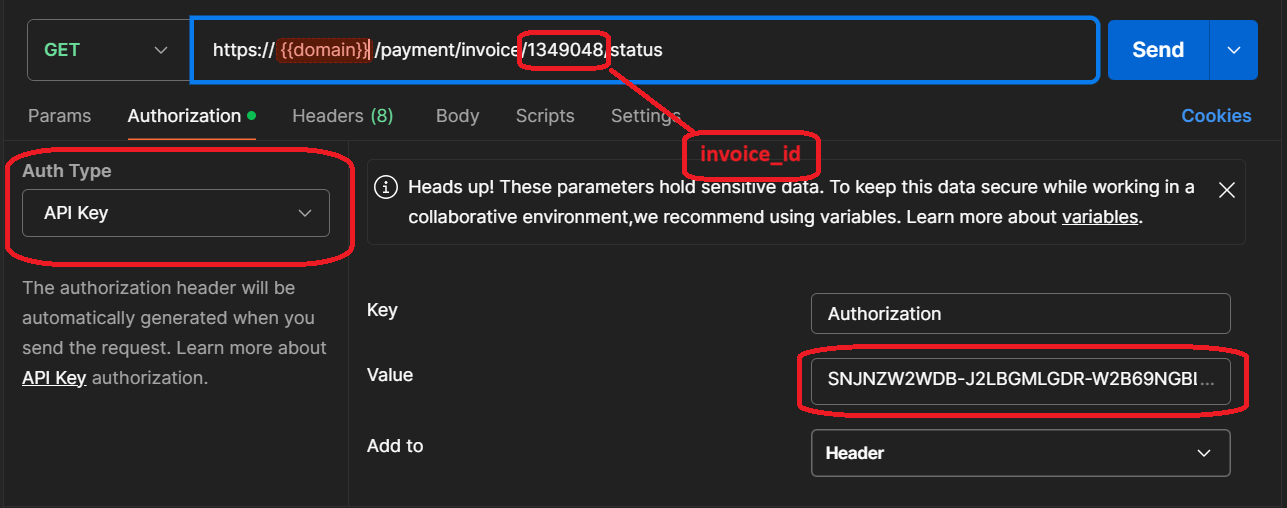
In the GET invoice status, we simply use a GET request passing only the invoice_id as a param in the endpoint URL to get the status. As shown in the below sample request.
In the POST invoice status, we simply use a POST request with only the invoice_id and profile_id as payload parameters to get the status. As shown below:
| Parameter | Data Type | Required | Purpose |
|---|---|---|---|
| INT | ✔ | The merchant Profile ID you can get from your PayTabs dashboard. For more information please check ourHow to get your account information from PT Dashboard?tutorial article. To know more about this parameter please click here profile_id. |
| |||
| INT | ✔ | Indicates the invoice reference you want to query. To know more about this parameter please click here invoice . |
| |||
Request & Response Payload Samples
This section is dedicated give you a sample API request payload using the above mentioned required parameters, along with showing you the response payload received upon using the request payload.
- Required Parameters Sample Payloads
The below sample request payload will show you how you can pass the above-mentioned required parameter/s, which are needed to be passed with valid values to perform a request. Along with the response payload received after using this request payload.
- Sample Request Payload
- Sample Response Payload
- Via Get Request
- Via Post Request
As mention before, for GET request, you only need to pass the invoice ID and the server key to the API key.
For POST request, you need to set as usual the API key and the profile ID in the request as shown below:
{
"profile_id": 79010,
"invoice_id": {{invoice_id}}
}
When an invoice is paid, it results in creating a new transaction, and you will receive the transaction details in the status response.
{
"invoice_status": "paid",
"tran_ref": "TST2104500076080",
"tran_status": "A",
"tran_status_msg": "Authorised"
}
Otherwise, it will return the invoice status only, as shown below:
{
    "invoice_status": "pending"
}
Expected Flow Behavior
When creating and sharing multiple invoices with customers, it is common to occasionally lose track of an invoice’s current status. This may occur if a response was not returned after invoice payment, or if the customer delays completing the payment. Or you need to take an action on the invoice and need to see current status, before taking action. In such scenarios, checking the invoice status helps confirm the current state of each invoice:
Begin by calling the API endpoint responsible for invoice creation.
Once an invoice is initiated, it is automatically assigned the
"pending"status. The invoice remains in this state until one of the following actions occurs:The invoice is successfully paid, and its status changes to
"paid".The invoice is explicitly canceled, and its status changes to
"canceled".
While the invoice status is
"pending", it can either be paid or canceled.If the invoice reaches its specified due date without receiving payment, its status is updated to
"overdue". This indicates that the customer received the invoice on the scheduled date but did not complete the payment within the allowed timeframe. it still can be paid or canceled, but it is considered overdue.sample response for overdue invoice:
{
  "invoice_status": "overdue"
}
When an invoice is successfully paid, a new transaction is created. The status response includes both the invoice status and the related transaction details.
Sample response for a paid invoice:
{
    "invoice_status": "paid",
    "tran_ref": "TST2104500076080",
    "tran_status": "A",
    "tran_status_msg": "Authorised"
}
If the invoice is still pending, the response will only include the invoice status without transaction details.
Sample response for a pending invoice:
{
    "invoice_status": "pending"
}
If an invoice is canceled or expires its status will be updated to
"canceled".Sample response for a canceled/expired invoice:
{
    "invoice_status": "canceled"
    // or expired
    "invoice_status": "expired"

}