Capture Transaction
PayTabs provides you with a collection of API endpoints which used to process all payments, regardless of if they are through either your own payment pages, the managed payment pages, or if you are using the hosted payment pages.
To capture a transaction means that the previously authorized amount from a previous auth transaction will be captured transferred from the cardholder's bank account to your bank account. In this manual, we walk you through how to use and manage the mentioned endpoint.
To process a capture request, tran_type MUST be capture, and the transaction reference of the original Authorized transaction that you want to capture should be passed in the tran_ref parameter.
Through out the article we will use the transaction types clarified in ourWhat is the "tran_type" (transaction type)?solution article.
An authorized ( Auth ) transaction remains on hold at the customer’s bank for a limited period, which varies by issuing bank but typically ranges between 7 to 14 days.
If neither a capture nor a void request is performed before this period ends, the authorized amount is automatically released back to the customer’s account by the bank.
The Endpoint and Related Postman Collection
In this tutorial, we will rely on the PayTabs Capture Transaction API Endpoint, mentioned on the PayTabs API endpoints postman collection, which you can access fromhere. he endpoint will need to be accessed with the mentioned HTTP request via the below URL endpoint:
| POST | {{domain}}/payment/request |
|---|
Please note that not using the proper endpoint URL {domain} will lead to authentication issues within your responses. To find the your proper domain you can read ourWhat is my (Region)/(endpoint URL)?tutorial article.
- KSA
- UAE
- Egypt
- Oman
- Jordan
- Kuwait
- Iraq
- Morocco
- Qatar
- Global
https://secure.paytabs.sa/payment/request
https://secure.paytabs.com/payment/request
https://secure-egypt.paytabs.com/payment/request
https://secure-oman.paytabs.com/payment/request
https://secure-jordan.paytabs.com/payment/request
https://secure-kuwait.paytabs.com/payment/request
https://secure-iraq.paytabs.com/payment/request
https://secure-morocco.paytabs.com/payment/request
https://secure-doha.paytabs.com/payment/request
https://secure-global.paytabs.com/payment/request
The Minimum Required Parameters
To initiate a capture payment request, there are minimum required parameters that need to be passed with valid information. The specification of these required parameters is clarified below:
| Parameter | Data Type | Min | Max | Required |
|---|---|---|---|---|
| INT STRING | Accept only valid profile number. | ✔ | |
| The merchant Profile ID you can get from your PayTabs dashboard. For more information please check our How to get your account information from PT Dashboard? solution article. To know more about this parameter please click here. | ||||
| ||||
| STRING | Valid string from this enum list: sale auth void release capture refund register | ✔ | |
| The identification of the type of the transaction.when it comes in the response, it's returned in success only To know more about these types please check our What is the "tran_type" (transaction type)? solution article. To know more about this parameter please click here. | ||||
| ||||
| STRING | Valid string from this list ecom recurring moto | ✔ | |
| The identification of the category/class this transaction will follow, such as eCommerce, Recurring, etc. To know more about these types please check our What is the "tran_class" (transaction class)? solution article. To know more about this parameter please click here. | ||||
| ||||
| STRING | 1 | 64 | ✔ |
| Indicates the cart/order id at the merchant end, it should be a unique value at the merchant end. to easily relate the PayTabs transaction to. when it comes in the response, it's returned in success only To know more about this parameter please click here. | ||||
| ||||
| STRING | 1 | 128 | ✔ |
| Indicates the cart/order description at the merchant end,it should be something descrips the reason of the transaction at the merchant end, to easily relate the PayTabs transaction to. when it comes in the response, it's returned in success only To know more about this parameter please click here. | ||||
| ||||
| STRING | 1 | 128 | ✔ |
| Indicates the transaction currency, which the customer will be charged with. To know more about this parameter please click here. | ||||
| ||||
| int|float|string | 0.01 | 9999999999.99 | ✔ |
| Indicates the amount of the transaction the customer is about to be charged. Both min and max values are subjected to the merchant transaction limits. if param donation_mode is true, cart_amount is not required and will be ignored when it comes in the response, it's returned in success only To know more about this parameter please click here. | ||||
| ||||
| Parameter | Data Type | Min | Max | Required |
|---|---|---|---|---|
| STRING | ✘ | ||
| Indicates the Transaction Reference on the PayTabs side check details on [Response Parameters | tran_ref] when it comes in the response, it's returned in success only | ||||
| ||||
Sample Request/Response Payloads
The below sample request payload will show you how you can pass the above-mentioned parameters, which are needed to be passed with valid values to perform a request.
Be aware that Capture request is ONLY available for successfully Authorized (A) transactions, and the tran_type MUST be capture.
- Request/Response Payloads
- Sample Request Payload
- Sample Response Payload
{
  "profile_id": 83061,
  "tran_type": "capture",
  "tran_class": "ecom",
  "cart_id": "CART#10001",
  "cart_currency": "SAR",
  "cart_amount": 200,
  "cart_description": "Cart Description",
  "tran_ref": "TST2234701408XXX"
}
{
    "tran_ref": "TST2105900091XXX",
    "previous_tran_ref": "TST2016700000XXX",
    "tran_type": "Capture"
    "cart_id": "CART#10001",
    "cart_description": "Capture reason",
    "cart_currency": "SAR",
    "cart_amount": "100.00",
    "tran_currency": "SAR",
    "tran_total": "100.00",
    "customer_details": {
        "name": "Technical Support",
        "email": "[email protected]",
        "phone": "+966 55 xxxxxx6",
        "street1": "address street",
        "city": "Jeddah",
        "state": "Makkah",
        "country": "SA",
        "ip": "86.111.XXX.X"
    },
    "payment_result": {
        "response_status": "A",
        "response_code": "036501",
        "response_message": "Authorised",
        "acquirer_message": "00:Approved",
        "acquirer_rrn": "42550903****",
        "transaction_time": "2024-09-11T09:01:51Z"
    },
    "payment_info": {
        "payment_method": "MasterCard",
        "card_type": "Credit",
        "card_scheme": "MasterCard",
        "payment_description": "5500 00## #### 5559",
        "expiryMonth": 12,
        "expiryYear": 2026
    },
     "user_defined": {
         "udf1": "UDF1 Test",
         "udf2": "UDF2 Test",
         "udf3": "UDF3 Test",
         "udf4": "UDF4 Test",
         "udf5": "UDF5 Test",
         "udf6": "UDF6 Test",
         "udf7": "UDF7 Test",
         "udf8": "UDF8 Test",
         "udf9": "UDF9 Test"
     },
     "serviceId": 1,
     "profileId": 703XX,
     "merchantId": 46XXX,
     "trace": "PMNT0401.676982BA.000580DA"
}
Expected Flow Behavior
Reaching this stage, you are now able to initiate a Capture Transaction, which is handled as a follow-up transaction. A capture can only be performed against a successful Authorization (AUTH) transaction and is used to transfer the authorized amount to the merchant’s account.
- Initial Authorization Transaction:
- The merchant initiates an Authorization (AUTH) transaction using the payment APIs, regardless of the integration type (e.g., Invoices, Hosted Payment Page, etc.).
- If the authorization is successful, a transaction reference (
tran_ref) is returned. - At this stage, the transaction amount is held on the customer’s bank account but is not yet transferred to the merchant.
- The merchant must securely store this transaction reference for any follow-up actions.
- Preparing for a Capture:
- Capture transactions are allowed only for transactions of typeAuthorization (AUTH) that have not been previously captured or voided.
- The previously saved
tran_refis required to initiate the capture request. - The capture request must include all required parameters as defined in theMinimum Required Parameters.
- Initiating the Capture Request:
The merchant sends a capture request using the follow-up Capture API via theendpoint, passing the original authorization transaction reference along with the required details.
- Successful Capture Scenario:
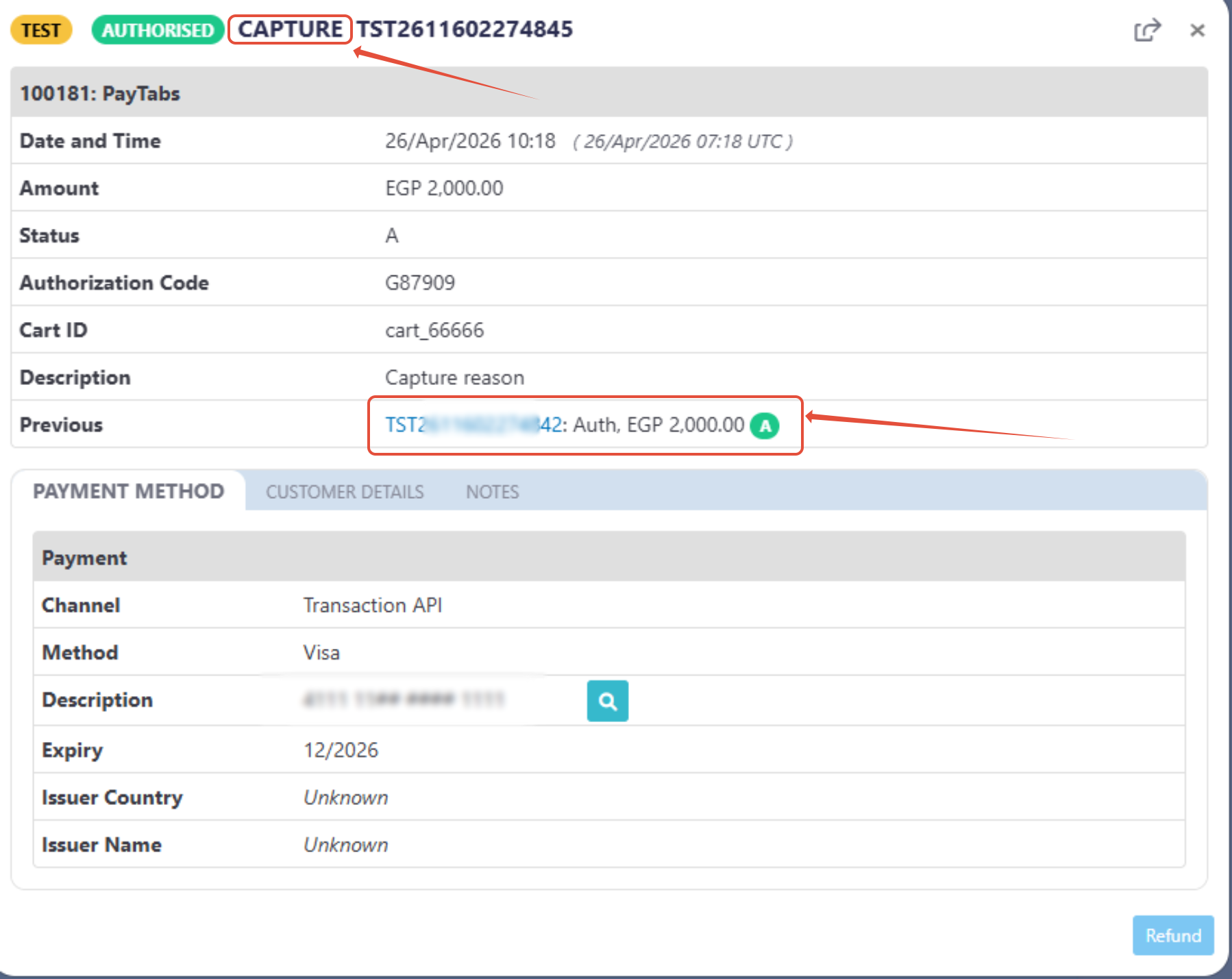
In the happy-path scenario, the capture is processed successfully. The authorized amount is transferred to the merchant’s account.
At this point, you will receive the capture transaction response as described in theSample Request/Response Payloads.
Below is a sample from the dashboard showing how a captured transaction appears:
- Capture Failure Scenarios:
A capture request may fail under certain conditions, including:
- The authorization has already been captured.
- The authorization has been voided.
- The authorization has expired.
- Invalid or missing transaction reference.
In these cases, the capture request is rejected and a detailed failure reason is returned in the response.